
Server State With TanStack Query: One Key, One Request, One Cache
Three components need the same list of books. Fetch it by hand and you get three requests; ask TanStack Query for one key and you get one. With real request counts, retries and a quiet refetch on tab focus.
What you will learn
- Explain why data from a server is different from state you own
- Share one cached list between components with useQuery and a query key
- Read isPending, data and error, and see why fetch needs res.ok
- Predict when TanStack Query sends a request: missing, stale or a retry
Before you start
- React components, props and useState
- async/await and fetch in JavaScript
Some state is yours. The author a user picked in a filter lives in your component, and nobody else knows about it. Other state is borrowed: a list of books lives on a server, and your page only holds a copy. That copy can get old, the server can be down, and three parts of the page may all want it at once.
This article follows one request for that list through a small library app and shows how TanStack Query keeps one shared copy of it. Every count and timing below comes from a real run of the project in Chrome.
One page, three parts, one list
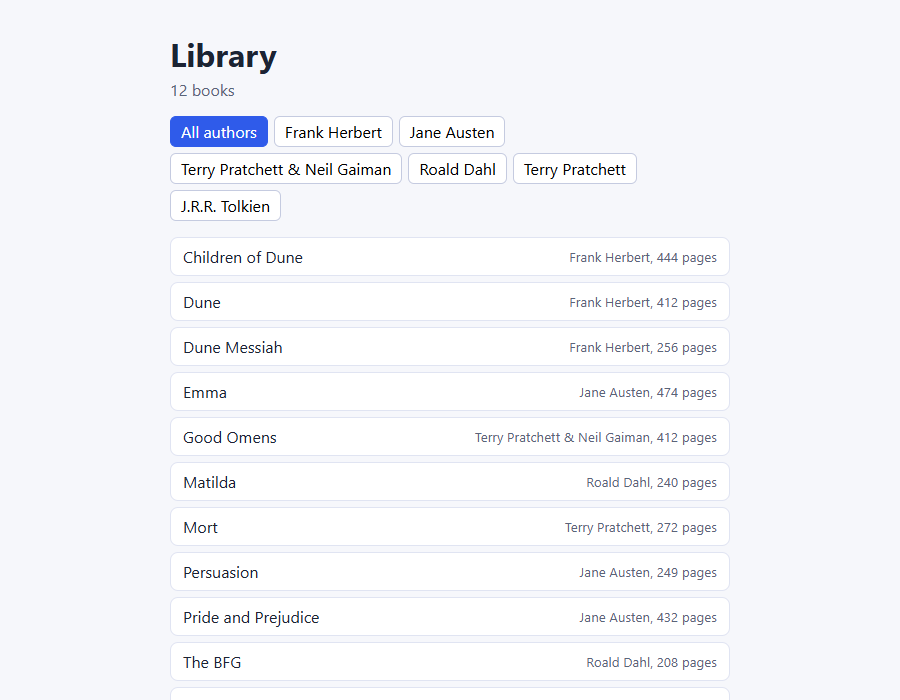
BookCount on top (12 books), AuthorFilter with seven buttons, and BookList with twelve rows.Each part is its own component, and each one needs the books. The count needs them to count, the filter needs them to know which authors exist, and the list needs them to draw rows. All three want the same thing from the same address, GET /api/books. Who should fetch it, and how often?
One request, one JSON answer
Start with a plain function in src/api.ts. Nothing in it knows about React yet.
// Our one hand-written server call. Every screen
// part reuses it through the query cache.
export type Book = {
  id: number
  title: string
  author: string
  pages: number
}

export type BookPage = {
  content: Book[]
  page: { totalElements: number }
}

export async function getBooks(): Promise<BookPage> {
  const res = await fetch('/api/books?size=50')
  // fetch only throws on network errors, so we
  // turn a 4xx or 5xx answer into an error here
  if (!res.ok) throw new Error(`HTTP ${res.status}`)
  return res.json()
}
getBooks sends one GET to the Book API (a FastAPI app on port 8080; the Vite dev server forwards /api to it). The answer is JSON with a content array of books and a page object. Without size=50, this API sends five books a page, three pages in all, so the query string asks for all twelve at once. res.json() turns the text into a BookPage object.
fetch does not throw on a 404
Lines 17 to 19 matter more than they look. fetch rejects only when there is no answer at all, for example when the network is down. If the server answers with any status, 200, 404 or 500, fetch resolves. Here is a real 404 from the same API:
GET /api/books/99  ->  404
Content-Type: application/problem+json
{"detail":"No book with id 99","instance":"/api/books/99","status":404,"title":"Book not found"}
fetch did not throw here; res.ok is simply false. So getBooks throws its own Error(`HTTP ${res.status}`). Now a 404 fails the same way a dead network does, and that is what lets TanStack Query retry it and show an error.
The hand-made way: every component fetches for itself
Many apps start with a small hook like this one:
import { useEffect, useState } from 'react'
import { getBooks, type BookPage } from '../api'

// The hand-made way: every component that calls this
// hook fetches on its own and keeps its own flags.
export function useBooksByHand() {
  const [data, setData] = useState<BookPage>()
  const [loading, setLoading] = useState(true)
  const [error, setError] = useState('')

  useEffect(() => {
    getBooks()
      .then(setData)
      .catch((e) => setError(e.message))
      .finally(() => setLoading(false))
  }, [])

  return { data, loading, error }
}
Each component that calls it gets three pieces of state and its own useEffect. Put it in BookCount, AuthorFilter and BookList, and one page load sends three GET requests to /api/books. You end up with three copies of the same twelve books and nine flags, and each copy can go out of date on its own.
Fetching is the easy part. Sharing one answer, and keeping it fresh, is the hard part.
A cache in the middle
The idea is a box between the components and the server: a query cache. A component asks for data by name, and that name is the query key, here ['books']. If the cache has no entry for the key, it creates one, marks it pending and sends one request. When the other two components ask for the same key, nothing new goes to the server. When the JSON comes back, the entry switches to success and every component that asked renders with the data.
Where the cache lives
import { createRoot } from 'react-dom/client'
import {
  QueryClient,
  QueryClientProvider,
} from '@tanstack/react-query'
import './index.css'
import App from './App'

// the cache lives in this one object
const queryClient = new QueryClient()

createRoot(document.getElementById('root')!).render(
  <QueryClientProvider client={queryClient}>
    <App />
  </QueryClientProvider>,
)
new QueryClient() is the one object that holds every query in the app. QueryClientProvider wraps App, so every useQuery call below it reaches the same client.
useQuery, step by step
import { useQuery } from '@tanstack/react-query'
import { getBooks } from './api'

type Props = { author: string }

export default function BookList({ author }: Props) {
  const { data, isPending, error } = useQuery({
    queryKey: ['books'], // the name of this data
    queryFn: getBooks,
  })
  if (isPending) return <p>Loading books...</p>
  if (error) return <p>{error.message}</p>

  const books = data.content.filter(
    (b) => !author || b.author === author,
  )
  return (
    <ul>
      {books.map((b) => (
        <li key={b.id}>
          <span>{b.title}</span>
          <small>{b.author}, {b.pages} pages</small>
        </li>
      ))}
    </ul>
  )
}- When
BookListrenders,useQuerytakes the key['books']to the cache. On the first render there is no entry, so the cache makes one: status pending, dataundefined. queryFn: getBookshands the function over without calling it. The cache calls it, and the request leaves.- On that first render
isPendingistrue, so line 11 returns Loading books.... - The answer arrives (the request took 17 ms in the run, and the list was on screen 216 ms after the page started loading). The entry switches to success,
BookListrenders again, and lines 14 to 25 draw twelve rows: Children of Dune, Dune, Dune Messiah and the rest.
Line 12 is the other branch: if the query fails, error is set and the page shows error.message.
Same key, no second request
import { useQuery } from '@tanstack/react-query'
import { getBooks } from './api'

export default function BookCount() {
  // same key as BookList: same data, no new request
  const { data } = useQuery({
    queryKey: ['books'],
    queryFn: getBooks,
  })
  if (!data) return <p className="count">...</p>
  const total = data.page.totalElements
  return <p className="count">{total} books</p>
}

// BREAK IT: queryKey: ['book-count'] would make
// this component fetch the books a second time
BookCount uses the same key, so the cache already has the entry and sends nothing new. It reads data.page.totalElements, which is 12. The comment at the bottom is the classic mistake: give it its own key, ['book-count'], and to the cache that is a different entry with its own request. In the run, that change made the page send two GET requests instead of one.
Ours, and borrowed
import { useState } from 'react'
import AuthorFilter from './AuthorFilter'
import BookCount from './BookCount'
import BookList from './BookList'

export default function App() {
  // only the choice lives here, not the books
  const [author, setAuthor] = useState('')

  return (
    <main>
      <h1>Library</h1>
      <BookCount />
      <AuthorFilter
        value={author}
        onChange={setAuthor}
      />
      <BookList author={author} />
    </main>
  )
}
The chosen author sits in useState. That is client state: we own it and the server knows nothing about it. The books are server state: they live on the server and we hold a borrowed copy in the cache. When the user clicks Jane Austen, BookList filters the cached list down to three rows (Emma, Persuasion, Pride and Prejudice) and sends zero new requests.
When the API is down
For this test nothing was listening behind the dev server, so every request got a 502. The first attempt fails and getBooks throws. The page does not show the error yet. TanStack Query retries three times, waiting longer each time, and the page keeps saying Loading books... because the query is still pending:
api down: GET /api/books x 4 at 164, 1195, 3212, 7222 ms, status 502, 502, 502, 502
api down: "Loading books..." at 155 ms; "HTTP 502" at 7227 ms
Only after the fourth failure does the status become error, and line 12 shows HTTP 502, about 7.2 seconds after the first try.
A quiet refetch on tab focus
Someone else can add a book while your page is open. By default staleTime is zero, so the cached list is stale the moment it arrives. Stale does not mean wrong or gone. Stale data stays on screen; it just means "check again at the next good moment".
One good moment is when the tab gets focus again. In the run, switching back to the tab sent one quiet GET in the background. The text Loading books... did not come back and all twelve rows stayed on screen. Focusing again one second later sent one more request, because the data was already stale again.
Requests, counted
| Situation | GET /api/books |
|---|---|
| Hand-made hook in three components | 3 |
useQuery, one key ['books'] | 1 |
BookCount with its own key ['book-count'] | 2 |
| Click an author filter | 0 |
| Tab gets focus again | 1 more |
| API down | 4 (one try, three retries) |
A request goes out only when the data is missing or stale, or to retry a failure.
Common mistakes
- Trusting fetch to fail on a 404. It resolves. Check
res.okand throw, or your error branch never runs. - Two keys for the same data. A different key is a different cache entry and another request.
- Copying server data into useState. Keep your own choices (the selected author) in state and leave the books in the cache.
- Calling the function in queryFn. Pass
getBooks, notgetBooks(); the cache decides when to call it.
Quick recap
| Idea | In the code |
|---|---|
| One cache for the whole app | new QueryClient() inside QueryClientProvider |
| Ask for data by name | useQuery({ queryKey: ['books'], queryFn: getBooks }) |
| First render, then data | isPending true, then data holds the books |
| Errors only after retries | three retries, then error is set |
| Stale data stays on screen | quiet refetch on tab focus |
Try it yourself
Change the key in BookCount.tsx to ['book-count'], open the browser's Network tab and count the requests to /api/books. Then put it back and watch the count drop to one. When you're ready to change data on the server, the next step is mutations and optimistic updates.
Related course on Udemy
The Python Architect Masterclass: Full Stack to AI Engineer
Python, Django, FastAPI, React, Docker, AWS, LLMs, RAG, agents and MCP, from first steps to AI engineer.View on Udemy ↗: The Python Architect Masterclass: Full Stack to AI Engineer (paid course, opens in a new tab)Related posts
Mutations and Optimistic Updates in TanStack Query: Change Data, Then Tell the Cache
Add a book with useMutation and let invalidateQueries refetch the list, then make delete instant: snapshot, remove the row in 3 ms, roll back on a 404 and refetch the truth in onSettled.
Generate TypeScript Types, Query Hooks and Zod From an OpenAPI Spec With Orval
Let the API's OpenAPI spec write your React client: Orval turns /v3/api-docs into TypeScript types, useGetBooks and a Zod schema, and a renamed field becomes error TS2339 at BookList.tsx line 26.
A Mock Backend in the Browser With Mock Service Worker, Generated From the Spec
Build the React screen before the API exists: Orval writes MSW handlers and faker data from the spec, a service worker answers GET /api/books inside the browser, and npm run dev:real switches back to the real server.
A React Client for a FastAPI API: The CORS Wall, CORSMiddleware and the Vite Proxy
Generate a React client from FastAPI's /openapi.json, then hit the CORS wall: the API answers 200 but the browser blocks it. Fix it with CORSMiddleware, or avoid it with the Vite proxy and one VITE_API_URL variable.