
React Context and Custom Hooks: Share One Value, Reuse the Logic
Replace three hops of prop drilling with a context, see the nearest Provider win, count which components re-render on a theme toggle, then pull localStorage logic into a useLocalStorage hook and break the rules of hooks on purpose.
What you will learn
- Recognise prop drilling and replace it with createContext, a Provider and useContext
- Predict which Provider a component reads, and what it gets with none
- Keep shared state in a Provider and know which components re-render when it changes
- Extract logic into a custom hook, and follow the rules of hooks
Before you start
- React props, state and useEffect
- Lifting state up
Some values are needed all over a page: the signed-in user, the theme. Passing them as props through every level gets painful fast. Context shares one value with a whole region of the tree. A custom hook does something different: it shares logic between components, not state. This article traces both with the lecture's task app.
Prop drilling: hop by hop
// The painful way: props passed down every level.
type Props = { user: string; theme: string }

export function DrillApp() {
  return <Page user="Emma" theme="dark" />
}

// Page does not use user or theme: it passes them on
function Page({ user, theme }: Props) {
  return <Sidebar user={user} theme={theme} />
}

// and neither does Sidebar
function Sidebar({ user, theme }: Props) {
  return <UserBadge user={user} theme={theme} />
}

// the only component that really uses them
function UserBadge({ user, theme }: Props) {
  return <p className={theme}>Signed in as {user}</p>
}
page: Signed in as Emma
class: darkThree hops, and two components (Page and Sidebar) that never use the values and only pass them on. Add one more prop and you edit every level on the way down. That is prop drilling.
createContext and the Provider
import { createContext, type ReactNode } from 'react'
import { countRender } from './renders'

export type User = { name: string; role: string }
type Props = { children: ReactNode }

// null is the default: what useContext gives
// when there is no Provider above
export const UserContext =
  createContext<User | null>(null)

export function UserProvider({ children }: Props) {
  countRender('UserProvider')
  const user: User = { name: 'Emma', role: 'Admin' }
  // everything inside children can read user
  return (
    <UserContext value={user}>
      {children}
    </UserContext>
  )
}
createContext(null) makes the context, and null is its default, used only when there is no Provider above. Lines 17 to 19 render the context itself as a Provider with a value (in React 19 you write <UserContext value={user}> directly). Every component inside children, at any depth, can read that value.
useContext looks up the tree
import { useContext } from 'react'
import { UserContext } from './UserContext'
import { countRender } from './renders'

export function UserBadge() {
  countRender('UserBadge')
  // asks the nearest UserContext Provider above
  const user = useContext(UserContext)
  const name = user ? user.name : 'nobody'
  return <p className="badge">Signed in as {name}</p>
}The nearest Provider, or the default
A small script renders UserBadge with no Provider, with one, and with a second Provider for Jack nested inside the Emma one:
no Provider:     Signed in as nobody
one Provider:    Signed in as Emma
nested Provider: Signed in as Jack
useContext stops at the first Provider it meets going up. With no Provider at all, it gets the default from createContext.
The state lives in the Provider
import { createContext, useState } from 'react'
import type { ReactNode } from 'react'
import { countRender } from './renders'

export type Theme = 'light' | 'dark'
type ThemeValue = { theme: Theme; toggle: () => void }
type Props = { children: ReactNode }

// the default: used when no Provider is above
export const ThemeContext = createContext<ThemeValue>({
  theme: 'light',
  toggle: () => {},
})

export function ThemeProvider({ children }: Props) {
  countRender('ThemeProvider')
  // the state lives here, in ONE place
  const [theme, setTheme] = useState<Theme>('light')
  const toggle = () =>
    setTheme(theme === 'light' ? 'dark' : 'light')
  return (
    <ThemeContext value={{ theme, toggle }}>
      <div className={'app ' + theme}>{children}</div>
    </ThemeContext>
  )
}
The theme is a normal useState, kept in one place, inside the Provider. The Provider's value is an object with theme and toggle, built fresh on every render. ThemeToggle reads both with no props at all:
import { useContext } from 'react'
import { ThemeContext } from './ThemeContext'
import { countRender } from './renders'

export function ThemeToggle() {
  countRender('ThemeToggle')
  // no props: theme and toggle come from the Provider
  const { theme, toggle } = useContext(ThemeContext)
  return (
    <button onClick={toggle}>
      {theme === 'light' ? 'Dark mode' : 'Light mode'}
    </button>
  )
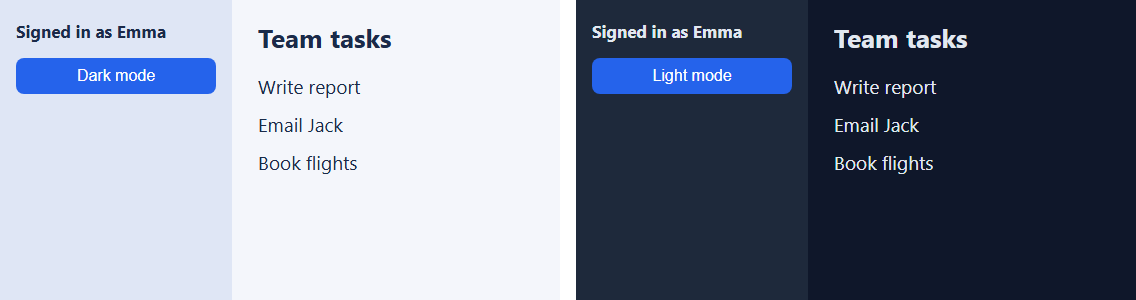
}
Who re-renders when the value changes?
Each component counts its renders. Click Dark mode once:
first render: 7 components, 1 render each
click: Dark mode
ThemeProvider: 2 renders
ThemeToggle: 2 renders
still 1: UserProvider, Layout, Sidebar, UserBadge, Tasks
page: button "Light mode", class "app dark"
The toggle sets the state in ThemeProvider, so it renders again and gives a new value. React re-renders every component that reads that context, here ThemeToggle. The other five stay at one render: they were created by App, outside the Provider, so React can skip them.
Remember the theme: from inline code to a custom hook
Now we want the theme to survive a reload. Written by hand inside the Provider:
export function ThemeInline({ children }: Props) {
  // first render: read the saved theme, or 'light'
  const [theme, setTheme] = useState<Theme>(() => {
    const saved = localStorage.getItem(key)
    return saved ? JSON.parse(saved) : 'light'
  })

  // after every change: save it
  useEffect(() => {
    localStorage.setItem(key, JSON.stringify(theme))
  }, [theme])
The useState initializer reads localStorage once, on the first render. The effect saves every change. Nothing in those lines is about themes, though. A filter, a language or a draft message could be remembered the same way. So pull it out:
import { useEffect, useState } from 'react'

// a custom hook: a plain function that calls hooks,
// and its name starts with "use"
export function useLocalStorage<T>(
  key: string,
  initial: T,
) {
  // first render: read the saved value, if any
  const [value, setValue] = useState<T>(() => {
    const saved = localStorage.getItem(key)
    return saved ? (JSON.parse(saved) as T) : initial
  })

  // after every change: save it again
  useEffect(() => {
    localStorage.setItem(key, JSON.stringify(value))
  }, [key, value])

  // give back the pair, just like useState
  return [value, setValue] as const
}
A custom hook is a plain function that calls hooks, and its name starts with use. The word theme became key, and light became initial. It returns the pair, so it feels exactly like useState. The Provider shrinks to one call:
// AFTER: the remembering is one hook call
export function ThemeProvider({ children }: Props) {
  const [theme, setTheme] =
    useLocalStorage<Theme>('theme', 'light')
  const toggle = () =>
    setTheme(theme === 'light' ? 'dark' : 'light')
  return (
    <ThemeContext value={{ theme, toggle }}>
      <div className={'app ' + theme}>{children}</div>
    </ThemeContext>
  )
}
provider: ThemeProvider + useLocalStorage
first load: button Dark mode
click: Dark mode
localStorage theme = "dark"
reload: button Light modeThe same five lines as the inline version: same behaviour, much less code.
One hook, two separate states
import { useLocalStorage } from './useLocalStorage'

// one component, used twice: every call of the hook
// gets its OWN state (and here its own key)
function Draft({ to }: { to: string }) {
  const [text, setText] =
    useLocalStorage('draft-' + to, '')
  return (
    <label className="draft">
      Note to {to}
      <input
        value={text}
        onChange={(e) => setText(e.target.value)}
      />
    </label>
  )
}

export function Drafts() {
  return (
    <section className="drafts">
      <Draft to="Emma" />
      <Draft to="Jack" />
    </section>
  )
}
Note to Emma: "" | Note to Jack: ""
type in box 1: Book the room
Note to Emma: "Book the room" | Note to Jack: ""
saved: draft-Emma = "Book the room", draft-Jack = ""Each Draft calls the hook, and each call gets its own state slot. Typing in Emma's box changes only Emma's text. A hook shares the logic, never the state. If two components must share one value, that is a job for context.
The rules of hooks
React finds each hook by the order of the calls, not by name. The lecture's Note component puts a useState inside an if. After a click there are suddenly two hook calls instead of one:
render 1: 1 hook call
click: Open
React has detected a change in the order of Hooks called by Note. This will lead to bugs and errors if not fixed. For more information, read the Rules of Hooks: https://react.dev/link/rules-of-hooks

   Previous render            Next render
   ------------------------------------------------------
1. useState                   useState
2. undefined                  useState
   ^^^^^^^^^^^^^^^^^^^^^^^^^^^^^^^^^^^^^^^^^^^^^^^^^^^^^^

Error: Rendered more hooks than during the previous render.
So: call hooks at the top level, never in an if, a loop or after an early return, and only in components and custom hooks. The same hooks, in the same order, on every render.
The whole app
import { ThemeProvider } from './ThemeContext'
import { UserProvider } from './UserContext'
import { Layout } from './Layout'

// two Providers: everything inside can read both
export default function App() {
  return (
    <ThemeProvider>
      <UserProvider>
        <Layout />
      </UserProvider>
    </ThemeProvider>
  )
}
Two Providers wrap the page, and Layout, Sidebar, UserBadge and ThemeToggle have no props between them. Providers wrap the part of the tree that needs the value, and the components inside just ask for it.
Recap
| Idea | What to remember |
|---|---|
| Prop drilling | Values passed through components that don't use them |
createContext(default) | Makes the context; the default is used only with no Provider above |
| Provider | Gives a value to everything inside; the nearest one wins |
useContext | Reads the value; readers re-render when it changes |
| Custom hook | A use... function that calls hooks; each call has its own state |
| Rules of hooks | Top level only, same order every render |
Try it yourself: add a role line to UserBadge that shows Admin from the same context, and use useLocalStorage to remember which task was last clicked. Next: routing with React Router.
StudyEasy AI Community

Learn AI engineering, share what you build, and connect with other learners.
Free resources: lesson files, notebooks and code
Ask questions and join engineering discussions
Meet real people learning and building with AI
Related course on Udemy
The Python Architect Masterclass: Full Stack to AI Engineer
Python, Django, FastAPI, React, Docker, AWS, LLMs, RAG, agents and MCP, from first steps to AI engineer.View on Udemy ↗: The Python Architect Masterclass: Full Stack to AI Engineer (paid course, opens in a new tab)Related posts
React State, Events, Lists and Conditional Rendering: Follow One Click
Follow one click through a React counter, render by render: what useState hands back, why a plain variable never updates the page, ternaries and &&, map with keys, and the index-as-key bug that moves a typed note to the wrong task.
React useEffect: When It Runs, What Cleanup Is For, and When You Don't Need One
Watch useEffect on a timeline with real render counts: the dependency array deciding re-runs, a timer cleanup that keeps one timer alive, the leak StrictMode exposes, and two effects you should delete (a copied total and a click flag).
Lifting State Up, Refs and React DevTools: Put State Where It Is Needed
A task board where the filter is stuck in one component, fixed by lifting it to App. Then useRef as a box React does not watch (three clicks, zero renders), a ref that refocuses an input, and the tree React DevTools shows.
Forms and Actions in React 19: Controlled Inputs, Form Actions, useActionState and useFormStatus
Four versions of an add-task form, traced with real logs: a controlled input, a classic onSubmit, a form action that gets FormData and resets itself, and useActionState with a pending button from useFormStatus, plus the draft trick that keeps typed text after an error.