
Forms With React Hook Form and Zod: The API's Rules in the Browser, the Server's Errors Under the Field
A book form that runs the API's own rules (a Zod schema generated from the spec) in the browser, sends nothing when pages is 0, and shows the server's 400 'title is required' under the Title field with setError.
What you will learn
- Run a Zod schema generated from the API contract with safeParse
- Plug that schema into useForm with zodResolver and submit with handleSubmit
- Use register and valueAsNumber so typing does not re-render and pages arrives as a number
- Put a server 400 message under the right field with setError
Before you start
- Generate TypeScript Types, Query Hooks and Zod From an OpenAPI Spec With Orval
- Mutations and Optimistic Updates in TanStack Query
A form to add a book has a title, an author and pages. The API has rules for each: title is required, author is required, pages must be more than zero. The browser should run the same rules first, so bad input stops right there without a request. And when the server still says no, its message should show up under the same field.
The browser checks for speed. The server checks for safety. This article wires both into one form with React Hook Form and Zod, and every message and count comes from a real run in Chrome.
The rules come from the contract
We don't type the rules again. The API's spec describes a new book as BookRequest: title and author are strings with minLength 1 and are required; pages is an integer with exclusiveMinimum 0. npm run api lets Orval turn that into a Zod schema (how that works is in the Orval article):
export const createBookBodyPagesExclusiveMin = 0;

export const CreateBookBody = zod.object({
  "title": zod.string().min(1),
  "author": zod.string().min(1),
  "pages": zod.int().gt(createBookBodyPagesExclusiveMin).optional()
})
minLength 1 became .min(1), exclusiveMinimum 0 became .gt(0), and pages is .optional() because this spec did not list it as required (generated from the FastAPI Book API, pages comes out required). The file is generated, so you regenerate it when the API changes, never edit it.
The schema on its own
Before any form, run the schema with no browser at all:
// The generated rules on their own: no form, no
// browser. What does CreateBookBody say?
import { CreateBookBody } from '../src/api/books.zod'

const book = {
  title: 'The Witches',
  author: 'Roald Dahl',
  pages: 208,
}

function check(label: string, body: unknown) {
  const res = CreateBookBody.safeParse(body)
  if (res.success) return console.log(label, '-> ok')
  for (const issue of res.error.issues) {
    const where = issue.path.join('.') + ':'
    console.log(label, '->', where, issue.message)
  }
}

check('pages 208  ', book)
check('pages 0    ', { ...book, pages: 0 })
check('title "   "', { ...book, title: '   ' })
// a text field gives a string: no valueAsNumber
check('pages "208"', { ...book, pages: '208' })
pages 208 -> ok
pages 0 -> pages: Too small: expected number to be >0
title " " -> ok
pages "208" -> pages: Invalid input: expected number, received stringsafeParse checks every field and gives back either success or a list of issues, each with a path (which field) and a message. Two results to remember: three spaces pass, because three spaces are three characters, and the text "208" fails, because it is a string, not a number.
useForm runs the schema
import { zodResolver } from '@hookform/resolvers/zod'
import { useForm } from 'react-hook-form'
import { CreateBookBody } from './api/books.zod'
import { useAddBook, type Values } from './useAddBook'

export default function AddBookForm() {
  // the rules come from the API's own contract
  const form = useForm<Values>({
    resolver: zodResolver(CreateBookBody),
  })
  const { register, handleSubmit, formState } = form
  const { errors } = formState
  const add = useAddBook(form)

  // called only when every rule passes
  function onValid(data: Values) {
    add.mutate({ data })
  }

  return (
    <form onSubmit={handleSubmit(onValid)}>
      <input
        placeholder="Title"
        {...register('title')}
      />
      <p className="error">{errors.title?.message}</p>
      <input
        placeholder="Author"
        {...register('author')}
      />
      <p className="error">{errors.author?.message}</p>
      <input
        type="number"
        placeholder="Pages"
        // an input gives text; this makes it a number
        {...register('pages', { valueAsNumber: true })}
      />
      <p className="error">{errors.pages?.message}</p>

      <button disabled={add.isPending}>
        Add book
      </button>
    </form>
  )
}

// BREAK IT: drop { valueAsNumber: true } and pages
// arrives as the text "208". Zod then says:
// pages: Invalid input: expected number, received stringzodResolver(CreateBookBody)wraps the schema so React Hook Form can run it.registerconnects a field,handleSubmitchecks the values and only then calls your function, andformState.errorsholds the messages (empty until a rule fails).onValidruns only when every rule passes, and callsadd.mutateto send the book.
register: the field keeps its value
register('title') returns a name, an onChange, an onBlur and a ref, and the spread puts them on the input. The ref hands the real input element to the form, so the text stays in the field and in the form's own store, not in React state. In the project's measurement, typing The Witches (11 keys) re-rendered AddBookForm 0 times. The same field kept in useState re-rendered 11 times, one per key. On a big form that adds up.
valueAsNumber: text becomes a number
Even type="number" gives its value as text. Without { valueAsNumber: true }, pages arrives as "208" and the schema says expected number, received string, the same failure as in rules.ts. With it, React Hook Form turns the text into 208. An empty pages field becomes NaN, and the message under Pages reads Invalid input: expected number, received NaN.
Stopped in the browser
Title The Witches, author Roald Dahl, pages 0, and the user clicks Add book. handleSubmit reads the values, runs the schema, and the pages rule fails. onValid is never called, so there is no mutate and no fetch:
pages 0, Add pressed -> messages: {"title":"","author":"","pages":"Too small: expected number to be >0"} | POST requests sent: 0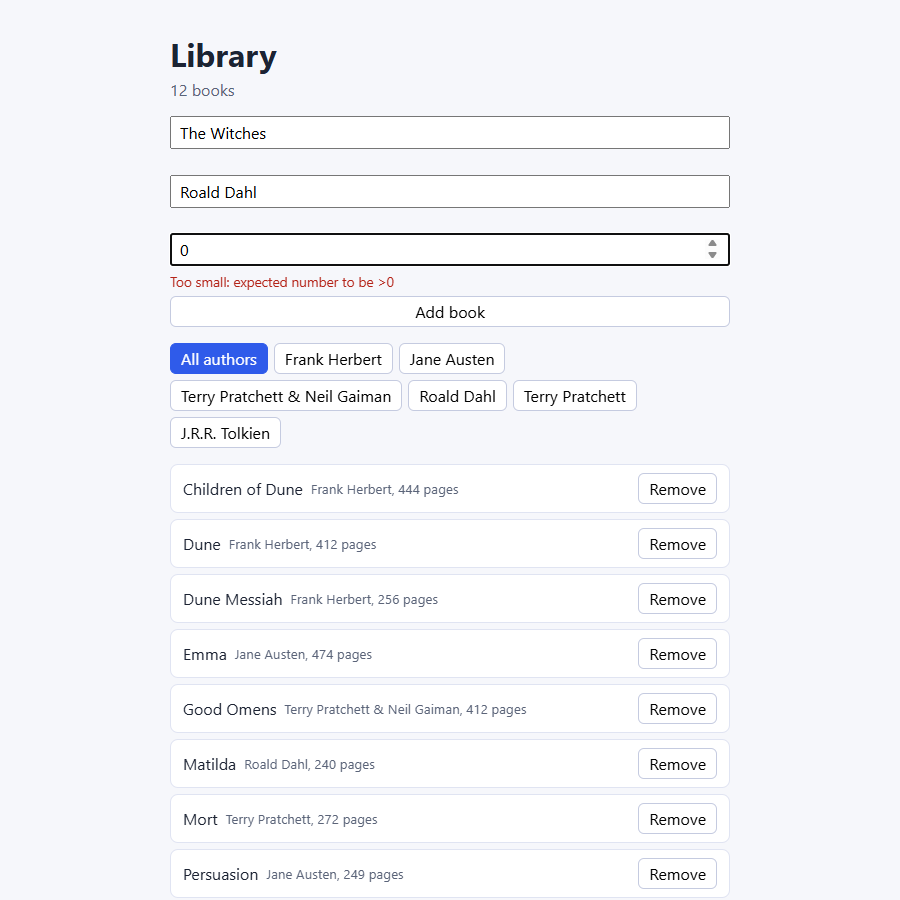
A rule only the server has
Now the title is three spaces. The schema passes, so onValid runs and one request goes out: a POST to /api/books with "title": " ". The server has a stricter rule, a title of only spaces is blank, and answers:
400 Bad Request
Content-Type: application/problem+json
{"detail":"The book has invalid fields","instance":"/api/books","status":400,"title":"Invalid book","errors":{"title":"title is required"}}
The response is not ok, so our customFetch throws an ApiError carrying the status and the parsed body:
export async function customFetch<T>(
  url: string,
  options: RequestInit,
): Promise<T> {
  const res = await fetch(url, options)
  const text = await res.text()
  const body = text ? JSON.parse(text) : undefined
  // fetch only throws on network errors, so 4xx and
  // 5xx are turned into an error here, once
  if (!res.ok) throw new ApiError(res.status, body)
  return body as T
}
setError: same field, same place
import { useQueryClient } from '@tanstack/react-query'
import type { UseFormReturn } from 'react-hook-form'
import type { z } from 'zod'
import {
  getGetBooksQueryKey,
  useCreateBook,
} from './api/books'
import type { CreateBookBody } from './api/books.zod'
import { ApiError } from './api/fetcher'

export type Values = z.infer<typeof CreateBookBody>

// a 400 Problem Detail has errors: field -> message
type Problem = { errors?: Record<string, string> }

export function useAddBook(
  form: UseFormReturn<Values>,
) {
  const queryClient = useQueryClient()
  return useCreateBook({
    mutation: {
      onSuccess: () => {
        form.reset() // empty form again
        return queryClient.invalidateQueries({
          queryKey: getGetBooksQueryKey(),
        })
      },
      // the server still checks: put its message
      // under the same field the browser uses
      onError: (error) => {
        if (!(error instanceof ApiError)) return
        const { errors } = error.body as Problem
        const fields = Object.entries(errors ?? {})
        for (const [field, message] of fields) {
          const name = field as keyof Values
          form.setError(name, { message })
        }
      },
    },
  })
}
onError checks that the error is our ApiError, takes the errors map out of the body (field name to message), turns it into pairs with Object.entries, and calls form.setError for each one. React Hook Form puts the message into errors.title, and the form shows it under Title, the same place a browser message would go:
title " " (3 spaces), Add pressed -> POST requests sent: 1 | messages: {"title":"title is required","author":"","pages":""}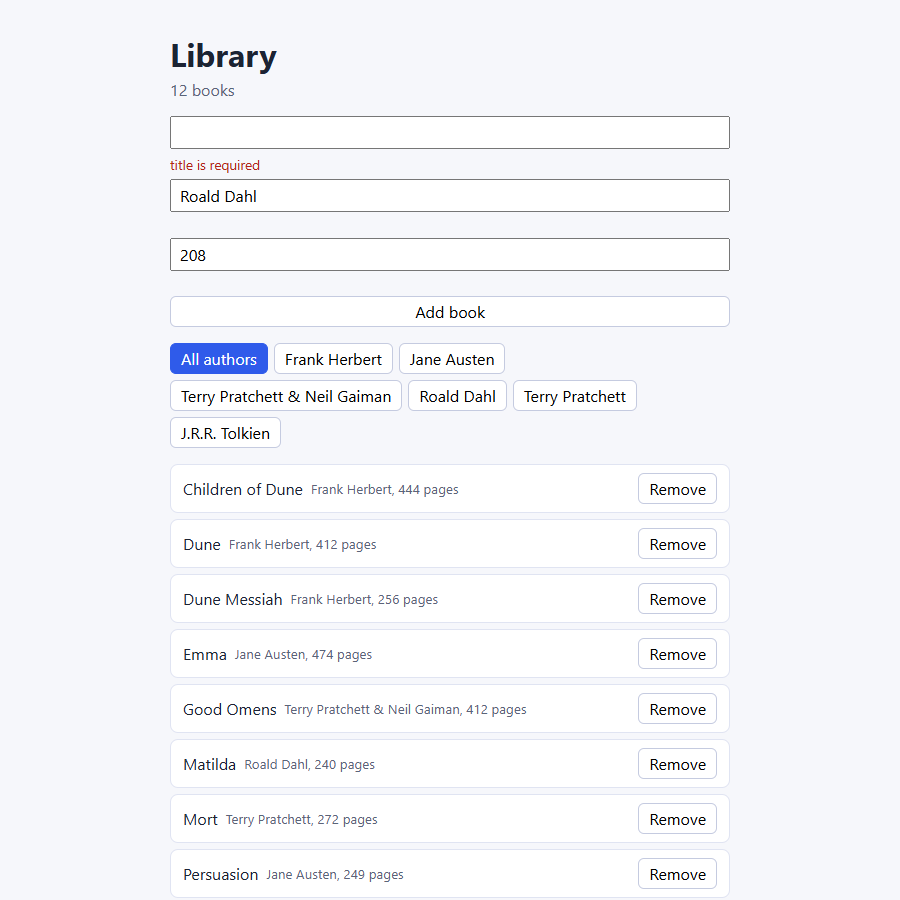
setError.Valid input: 201 Created
The Witches, Roald Dahl, 208. Every rule passes, the generated useCreateBook sends the POST, and the server answers 201 with a Location of /api/books/13 and id 13. onSuccess calls form.reset(), so all three fields are empty again, then invalidates the books query. The list asks the API again and the count goes from 12 to 13:
valid input -> POST requests since: 1 | count on screen: 13 books
form cleared: {"title":"","author":"","pages":""} | messages: {"title":"","author":"","pages":""}
Three submits, side by side
| Typed | Browser | Requests | Server | Under the field |
|---|---|---|---|---|
| pages 0 | fails | 0 | (not asked) | Too small: expected number to be >0 |
| title of three spaces | passes | 1 | 400 | title is required |
| valid book | passes | 1 | 201, id 13 | form cleared, 13 books |
The browser check can be skipped by anyone who sends a request directly. Send the same bad body straight to the API with pages 0, and the server still answers 400 with pages must be more than 0. That is why the server check always stays.
Common mistakes
- Dropping valueAsNumber. Pages arrives as a string and every submit fails with expected number, received string.
- Trusting the browser check alone. It is for speed. The server's rules are the real gate.
- Showing server errors in a separate banner. Map the 400's field errors with
setErrorso they land where the user is looking. - Hand-editing the generated schema. Change the API, then run
npm run api.
Quick recap
| Piece | Job |
|---|---|
CreateBookBody | The API's own rules, generated from the contract |
zodResolver + handleSubmit | Runs the rules on submit; onValid only with valid data |
register | The field keeps its value; no render per key |
valueAsNumber | Turns the field's text into a number |
setError | Puts the server's 400 message under the field |
reset + invalidate | On 201, clear the form and refresh the list |
StudyEasy AI Community

Learn AI engineering, share what you build, and connect with other learners.
Free resources: lesson files, notebooks and code
Ask questions and join engineering discussions
Meet real people learning and building with AI
Related course on Udemy
The Python Architect Masterclass: Full Stack to AI Engineer
Python, Django, FastAPI, React, Docker, AWS, LLMs, RAG, agents and MCP, from first steps to AI engineer.View on Udemy ↗: The Python Architect Masterclass: Full Stack to AI Engineer (paid course, opens in a new tab)Related posts
Server State With TanStack Query: One Key, One Request, One Cache
Three components need the same list of books. Fetch it by hand and you get three requests; ask TanStack Query for one key and you get one. With real request counts, retries and a quiet refetch on tab focus.
Mutations and Optimistic Updates in TanStack Query: Change Data, Then Tell the Cache
Add a book with useMutation and let invalidateQueries refetch the list, then make delete instant: snapshot, remove the row in 3 ms, roll back on a 404 and refetch the truth in onSettled.
Generate TypeScript Types, Query Hooks and Zod From an OpenAPI Spec With Orval
Let the API's OpenAPI spec write your React client: Orval turns /v3/api-docs into TypeScript types, useGetBooks and a Zod schema, and a renamed field becomes error TS2339 at BookList.tsx line 26.
A Mock Backend in the Browser With Mock Service Worker, Generated From the Spec
Build the React screen before the API exists: Orval writes MSW handlers and faker data from the spec, a service worker answers GET /api/books inside the browser, and npm run dev:real switches back to the real server.