
Mutations and Optimistic Updates in TanStack Query: Change Data, Then Tell the Cache
Add a book with useMutation and let invalidateQueries refetch the list, then make delete instant: snapshot, remove the row in 3 ms, roll back on a 404 and refetch the truth in onSettled.
What you will learn
- Send a POST with useMutation and refresh the list with invalidateQueries
- Make a delete feel instant with onMutate and setQueryData
- Roll back with a snapshot in onError and settle on the server's truth in onSettled
- Explain why deleteBook must throw on a 404
Before you start
- Server State With TanStack Query
- React forms and event handlers
A query reads. It says "give me", and it can run again and again without changing anything. A mutation changes data on the server. It says "change this", and it runs once, only when the user asks.
The catch: right after a mutation, the list in your cache is out of date. The server now has 13 books and the cache still says 12, because nobody told it. This article adds a book, then makes a delete feel instant with a safe way back. It builds on the library app from Server State With TanStack Query, and every timing comes from a real Chrome run.
The server calls
// Hand-written server calls. Reading and changing
// both go through the same few lines.
export type Book = {
  id: number
  title: string
  author: string
  pages: number
}

export type NewBook = Omit<Book, 'id'>

export type BookPage = {
  content: Book[]
  page: { totalElements: number }
}

const json = { 'Content-Type': 'application/json' }

export async function getBooks(): Promise<BookPage> {
  const res = await fetch('/api/books?size=50')
  // fetch only throws on network errors, so we
  // turn a 4xx or 5xx answer into an error here
  if (!res.ok) throw new Error(`HTTP ${res.status}`)
  return res.json()
}

export async function addBook(book: NewBook) {
  const res = await fetch('/api/books', {
    method: 'POST',
    headers: json,
    body: JSON.stringify(book),
  })
  if (!res.ok) throw new Error(`HTTP ${res.status}`)
  return res.json() as Promise<Book>
}

export async function deleteBook(id: number) {
  const res = await fetch(`/api/books/${id}`, {
    method: 'DELETE',
  })
  // a 404 still resolves: throw, so onError runs
  if (!res.ok) throw new Error(`HTTP ${res.status}`)
}
addBook sends a POST with the book as JSON. JSON.stringify turns the object into text, because only text travels. deleteBook puts the id in the URL and sends no body. Both throw when res.ok is false. Keep that line in mind; the rollback later depends on it.
useMutation: a change, ready to send
import {
  useMutation,
  useQueryClient,
} from '@tanstack/react-query'
import { addBook } from './api'

export default function AddBook() {
  const qc = useQueryClient()
  const add = useMutation({
    mutationFn: addBook,
    // the list on screen is now out of date
    onSuccess: () =>
      qc.invalidateQueries({ queryKey: ['books'] }),
  })

  function submit(form: FormData) {
    add.mutate({
      title: String(form.get('title')),
      author: String(form.get('author')),
      pages: Number(form.get('pages')),
    })
  }

  return (
    <form action={submit}>
      <input name="title" placeholder="Title" />
      <input name="author" placeholder="Author" />
      <input name="pages" type="number"
        placeholder="Pages" />
      <button disabled={add.isPending}>
        {add.isPending ? 'Adding...' : 'Add book'}
      </button>
    </form>
  )
}- Line 9 calls
useMutationwithmutationFn: addBook. Nothing is sent yet; the function is only kept. You get backadd, with amutatefunction andisPendingset to false. - The user types The Witches, Roald Dahl, 208 and clicks Add book. The form action hands
submitthe form data, and lines 17 to 21 build a plain object.Numberturns the text "208" into the number 208. add.mutate(...)runs the mutation.isPendingflips to true, so the button is disabled and says Adding... (no double clicks).
The POST goes out and the server answers 201 Created, with a Location header of /api/books/13 and the new book in the body. The id, 13, came from the server; we never sent one.
invalidateQueries: mark the list stale
Because the server said yes, onSuccess runs and calls invalidateQueries({ queryKey: ['books'] }). That does not fetch anything by itself. It stamps the ['books'] entry as stale. Three components read that entry and they are still on screen, so the cache fetches the list again right away:
after Add book: POST /api/books  ->  GET /api/books?size=50
count on screen: 13 books | list items: 13
The count goes from 12 to 13 and The Witches appears where the server's sort puts it. You did not patch the list by hand. And because onSuccess returns the refetch promise, the button keeps saying Adding... until the new list is in.
Waiting, or optimistic
Deleting a book can work two ways. The first waits for the server. With 300 ms of delay added to the network, the answer came at 330 ms, and all that time the row just sat there. The second is optimistic: change the screen first, check with the server in the background. With the same delay the row was gone at 2 ms, and the DELETE still finished at 330 ms in the background. With no added delay, on the local machine, the row was gone at 3 ms and the answer came at 39 ms.
Optimistic means you guess the server will say yes. So you also need a way back when it says no. Here is the whole hook:
import {
  useMutation,
  useQueryClient,
} from '@tanstack/react-query'
import { deleteBook, type BookPage } from './api'

const key = ['books']

type Cached = BookPage | undefined

// a NEW cached list, without one book
function without(old: Cached, id: number) {
  if (!old) return old
  const content = old.content.filter(
    (b) => b.id !== id,
  )
  const page = { totalElements: content.length }
  return { content, page }
}

// Optimistic: the row leaves the screen at once and
// a snapshot waits in case the server says no.
export function useDeleteBook() {
  const qc = useQueryClient()
  return useMutation({
    mutationFn: deleteBook,
    onMutate: async (id: number) => {
      await qc.cancelQueries({ queryKey: key })
      const previous = qc.getQueryData<BookPage>(key)
      qc.setQueryData(key, without(previous, id))
      return { previous }
    },
    // the server said no: put the snapshot back
    onError: (_err, _id, context) =>
      qc.setQueryData(key, context?.previous),
    // yes or no: refetch, so the screen ends on
    // what the server really has
    onSettled: () =>
      qc.invalidateQueries({ queryKey: key }),
  })
}

// BREAK IT: invalidate in onSuccess only, and after a
// failed delete the list is never fetched againStep 1: a snapshot first
Say we remove Mort, id 11. remove.mutate(11) runs onMutate before any request leaves. Line 28, cancelQueries, stops a refetch of ['books'] that might be on its way, because it could come back and undo our change. Line 29, getQueryData, reads the list as it is now and keeps it in previous. That is the snapshot, like saving a game before a hard level.
Step 2: the row leaves at once
without builds a new list where every book except id 11 is copied over, and works out the new total. previous is not touched, which is exactly why the snapshot works. Line 30, setQueryData, puts the new list in the cache, every reader re-renders, and Mort is gone from the page 3 ms after the click. Line 31 returns { previous }, and TanStack Query keeps it as this mutation's context.
Step 3: deleteBook must turn a 404 into an error
A DELETE for id 11 answers 204 No Content; res.ok is true and the promise resolves. A DELETE for a book that is already gone answers 404 with a small JSON body, and fetch still resolves, because a 404 is still an answer. Line 42 of api.ts throws when res.ok is false, and that throw is what makes the mutation fail and onError run. Without it, the rollback never happens.
Step 4: success or failure, then settle
On a 204 the snapshot is simply not needed. onSettled runs either way (settled means finished, with a yes or a no). It invalidates ['books'], a GET goes out, and the screen ends on what the server really has.
The failure case, for real
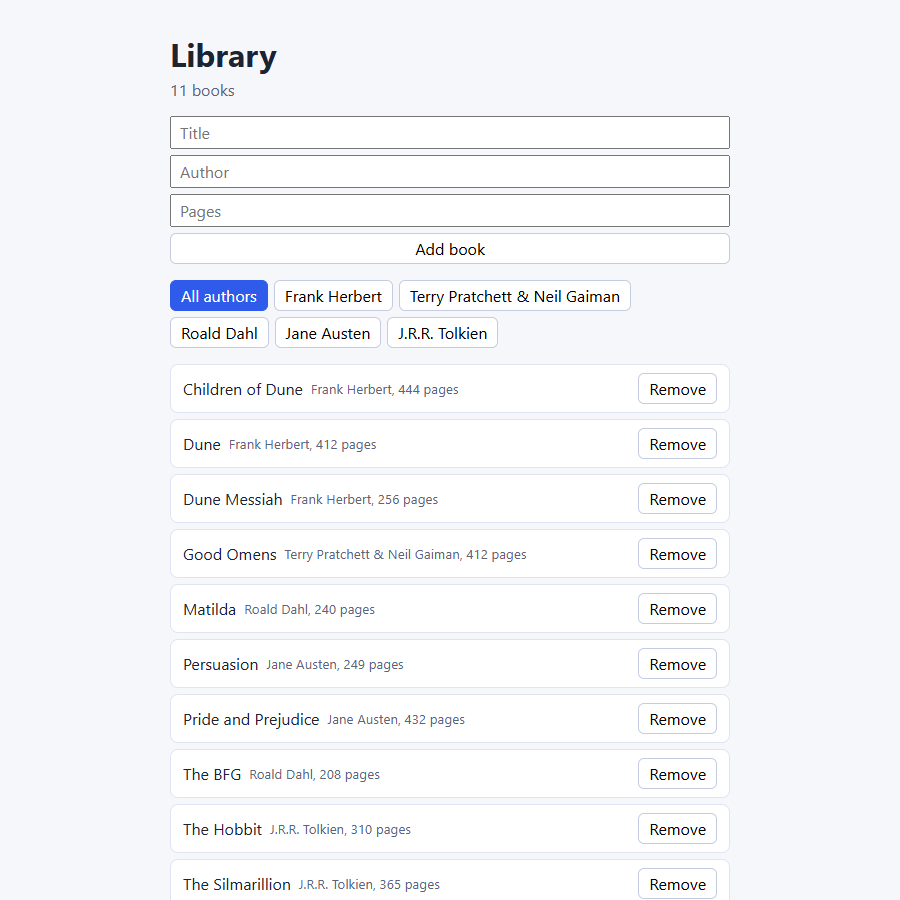
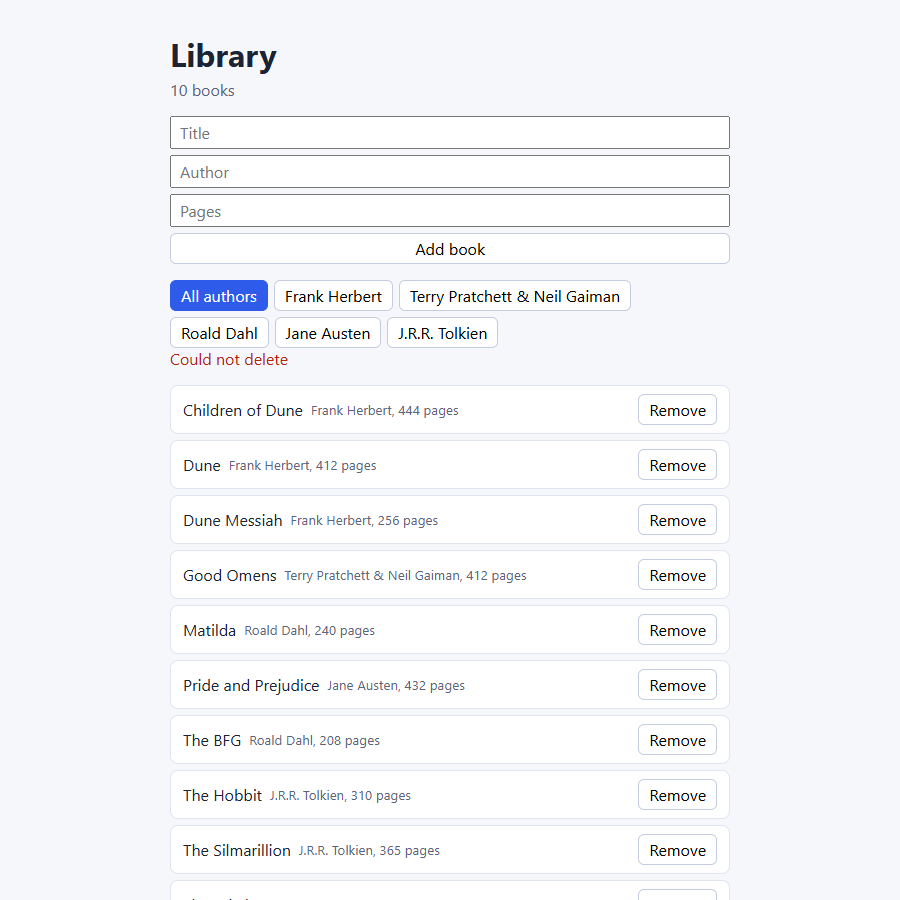
To make the server say no, another client deleted Persuasion (id 4) first and got a 204. Our page had loaded earlier, so Persuasion was still on our screen. Then we clicked Remove on it:
requests: DELETE /api/books/4  ->  GET /api/books?size=50
row events on screen: row gone at 3 ms -> row back at 26 ms -> row gone at 2564 ms
after the refetch: toast: "Could not delete" | row present: false | count: 10 books
The row left at once, the 404 came back, onError took previous from the context and put the snapshot back (the row returned at 26 ms). Then onSettled refetched, ten books came back without Persuasion, and the row left again with the message Could not delete. In this run the refetch was held for 2.5 seconds on purpose, so the in-between state could be captured.
What the user clicks
  const remove = useDeleteBook()
  if (isPending) return <p>Loading books...</p>
  if (error) return <p>{error.message}</p>

  const books = data.content.filter(
    (b) => !author || b.author === author,
  )
  return (
    <>
      {remove.isError && (
        <p className="toast">Could not delete</p>
      )}
      <ul>
        {books.map((b) => (
          <li key={b.id}>
            <span>{b.title}</span>
            <small>{b.author}, {b.pages} pages</small>
            <button
              onClick={() => remove.mutate(b.id)}
            >
              Remove
            </button>
          </li>
        ))}
      </ul>
    </>
  )
(An excerpt of BookList.tsx.) Each row's Remove button calls remove.mutate(b.id) with that row's own id, and remove.isError shows the toast.
Common mistakes
- Invalidating only in onSuccess. After a 404 nothing refetches, and the stale row stays on screen even though the server lost it long ago. Invalidate in
onSettled. - Changing the cached list in place. If you mutate
previousinstead of building a new list, your snapshot changes too and there is nothing to roll back to. - Not throwing on a non-ok response. fetch resolves on a 404, so
onErrornever runs. - Skipping cancelQueries. A refetch that was already in flight can land after your optimistic change and overwrite it.
Quick recap
| Step | Code | In the run |
|---|---|---|
| Send a change once | useMutation, mutate | POST answered 201, id 13 |
| Refresh readers | invalidateQueries(['books']) | 12 books became 13 |
| Change the screen first | onMutate + setQueryData | row gone at 3 ms |
| Undo the guess | onError puts previous back | row back at 26 ms |
| End on the truth | onSettled invalidates | 10 books, Could not delete |
Try it yourself
Move the invalidateQueries call from onSettled into an onSuccess, delete a book from a second tab, then click Remove on it in the first tab. Watch the stale row stay forever, then put onSettled back.
Related course on Udemy
The Python Architect Masterclass: Full Stack to AI Engineer
Python, Django, FastAPI, React, Docker, AWS, LLMs, RAG, agents and MCP, from first steps to AI engineer.View on Udemy ↗: The Python Architect Masterclass: Full Stack to AI Engineer (paid course, opens in a new tab)Related posts
Server State With TanStack Query: One Key, One Request, One Cache
Three components need the same list of books. Fetch it by hand and you get three requests; ask TanStack Query for one key and you get one. With real request counts, retries and a quiet refetch on tab focus.
Generate TypeScript Types, Query Hooks and Zod From an OpenAPI Spec With Orval
Let the API's OpenAPI spec write your React client: Orval turns /v3/api-docs into TypeScript types, useGetBooks and a Zod schema, and a renamed field becomes error TS2339 at BookList.tsx line 26.
A Mock Backend in the Browser With Mock Service Worker, Generated From the Spec
Build the React screen before the API exists: Orval writes MSW handlers and faker data from the spec, a service worker answers GET /api/books inside the browser, and npm run dev:real switches back to the real server.
A React Client for a FastAPI API: The CORS Wall, CORSMiddleware and the Vite Proxy
Generate a React client from FastAPI's /openapi.json, then hit the CORS wall: the API answers 200 but the browser blocks it. Fix it with CORSMiddleware, or avoid it with the Vite proxy and one VITE_API_URL variable.