
A Mock Backend in the Browser With Mock Service Worker, Generated From the Spec
Build the React screen before the API exists: Orval writes MSW handlers and faker data from the spec, a service worker answers GET /api/books inside the browser, and npm run dev:real switches back to the real server.
What you will learn
- Explain how a service worker can answer a fetch inside the browser
- Generate MSW handlers and faker data from an OpenAPI spec with Orval's mock option
- Start the worker before the first render, in development only
- Switch between mocked and real backends without changing app code
Before you start
- Generate TypeScript Types, Query Hooks and Zod From an OpenAPI Spec With Orval
- Server State With TanStack Query
On real teams the screen is often ready before the API is. Without a backend, the front end has nothing to talk to and waits. But both sides can agree on the spec first, and from that same spec you can generate a fake backend. The screen gets built and tried now, and when the real API is ready you simply switch to it.
This article uses Mock Service Worker (MSW): a small script in the browser catches the request your app sends and answers it with fake data that has exactly the shape the spec describes. The project is the library client from the Orval article.
Normal mode and mocked mode
Normally, GET /api/books?size=50 leaves the browser, crosses the network, reaches the Book API on port 8080, and 200 with twelve books rides back. If there is no server yet, nothing answers and the screen can't work.
A service worker is a script the browser runs on the side, between your app and the network. Ours lives in public/mockServiceWorker.js. When the app calls fetch, the browser fires a fetch event and the worker catches it. The worker does not know the answer itself: it sends a REQUEST message to the page, where our handlers live. If a handler matched, the page sends back MOCK_RESPONSE and the worker hands that answer to the waiting fetch. If none matched, the worker lets the request pass to the network as if nothing happened. The app cannot tell who answered.
The worker file is copied in by the msw init command, and its own header comment asks you not to modify it.
Orval writes the handlers and the fake data
We don't write handlers by hand. Turning on mock: true in the Orval config is enough (the first part of orval.config.ts; the Zod config below it is unchanged):
import { defineConfig } from 'orval'
import { faker } from '@faker-js/faker'
import { operationName } from './orval.names'

// the API describes itself here
const input = 'http://localhost:8080/v3/api-docs'

// one rule per field: realistic fake values
const fake = {
  id: () => faker.number.int({ min: 1, max: 99 }),
  title: () => faker.book.title(),
  author: () => faker.book.author(),
  pages: () =>
    faker.number.int({ min: 120, max: 600 }),
  totalElements: () => 6,
  totalPages: () => 1,
}

export default defineConfig({
  books: {
    input,
    output: {
      target: 'src/api/books.ts',
      schemas: 'src/api/model',
      client: 'react-query',
      // realistic fake answers for the mock server
      mock: true,
      override: {
        operationName,
        mock: {
          required: true,
          arrayMin: 6,
          arrayMax: 6,
          properties: fake,
        },
        // our own fetch wrapper (fetcher.ts)
        mutator: {
          path: 'src/api/fetcher.ts',
          name: 'customFetch',
        },
        // hooks return the body, not { data, status }
        fetch: {
          includeHttpResponseReturnType: false,
        },
      },
      // short lines, the same style as our own files
      formatter: 'prettier',
    },
  },
Next to books.ts, Orval now writes books.msw.ts with the handlers and books.faker.ts with the fake data. The fake object holds one rule per field: an id from 1 to 99, a title from faker.book.title(), an author from faker.book.author(), pages from 120 to 600, and always six elements on one page. required: true fills every field, and arrayMin and arrayMax of 6 give lists of exactly six. The input is the same spec the client uses, so the mocks always have the real shape.
The faker lines fill one answer
An excerpt of the generated books.msw.ts:
export const getGetBooksResponseMock = (
  overrideResponse: Partial<
    Extract<PagedModelBookResponse, object>
  > = {},
): PagedModelBookResponse => ({
  content: Array.from(
    { length: faker.number.int({ min: 6, max: 6 }) },
    (_, i) => i + 1,
  ).map(() => ({
    id: (() =>
      faker.number.int({ min: 1, max: 99 }))(),
    title: (() => faker.book.title())(),
    author: (() => faker.book.author())(),
    pages: (() =>
      faker.number.int({ min: 120, max: 600 }))(),
  })),
  page: {
    size: faker.number.int(),
    number: faker.number.int(),
    totalElements: (() => 6)(),
    totalPages: (() => 1)(),
  },
  ...overrideResponse,
})
Six empty rows, each filled field by field with our rules. Look at page.size and page.number: we gave them no rule, so faker picks any integer. The value has the right type, but it is a huge number no one would ask for as a page size. Realistic, not real: one of the fake rows in the run was The Hobbit by Laurence Sterne.
A handler: match, then answer
export const getGetBooksMockHandler = (
  overrideResponse?:
    | PagedModelBookResponse
    | ((
        info: Parameters<HttpResponseResolver>[0],
      ) =>
        | Promise<PagedModelBookResponse>
        | PagedModelBookResponse),
  options?: RequestHandlerOptions,
) => {
  return http.get(
    '*/api/books',
    async (
      info: Parameters<HttpResponseResolver>[0],
    ) => {
      return HttpResponse.json(
        overrideResponse !== undefined
          ? typeof overrideResponse === 'function'
            ? await overrideResponse(info)
            : overrideResponse
          : getGetBooksResponseMock(),
        { status: 200 },
      )
    },
    options,
  )
}
A handler is a method, a path and a function that returns the answer. http.get('*/api/books', ...) matches any origin (the star) with the path /api/books; the query string ?size=50 is not part of the match. HttpResponse.json(..., { status: 200 }) answers exactly like a real server would. Pass an overrideResponse when a test needs one exact case. There is one handler per endpoint in the spec.
All handlers into one worker
import { faker } from '@faker-js/faker'
import { setupWorker } from 'msw/browser'
import { getLibraryAPIMock } from '../api/books.msw'

// same fake books on every reload
faker.seed(8)

// the handlers were generated from the spec
export const worker = setupWorker(
  ...getLibraryAPIMock(),
)

// BREAK IT: delete public/mockServiceWorker.js and
// worker.start() throws "[MSW] Failed to register the
// Service Worker" - nothing renders, the page is empty
getLibraryAPIMock() returns all seven generated handlers, and setupWorker turns them into a worker that is not started yet. faker.seed(8) makes faker produce the same sequence every time, so a reload shows the same books. Without the seed, the list would change on every reload.
Start the worker, then render
import { createRoot } from 'react-dom/client'
import {
  QueryClient,
  QueryClientProvider,
} from '@tanstack/react-query'
import './index.css'
import App from './App'

const queryClient = new QueryClient()

async function start() {
  // dev only: the worker answers /api requests itself
  const mocks = import.meta.env.VITE_MOCKS === 'on'
  if (import.meta.env.DEV && mocks) {
    const { worker } = await import('./mocks/browser')
    await worker.start()
  }
  createRoot(document.getElementById('root')!).render(
    <QueryClientProvider client={queryClient}>
      <App />
    </QueryClientProvider>,
  )
}
start()
# mocks on: a service worker answers /api requests, no backend needed
VITE_MOCKS=onLine 14 checks two things: import.meta.env.DEV, true in the dev server, and VITE_MOCKS, which .env.development sets to on. Only then does line 15 load msw, faker and the handlers with a dynamic import. Line 16 waits for worker.start(), which registers /mockServiceWorker.js, and only then is the app rendered. If you rendered first, the very first request could go out before the worker was ready.
Six books, no server running
With the Book API stopped (reachable on :8080 ? false) and npm run dev, the run recorded:
PASS A (mocks on, API stopped): GET /api/books requests = 1
console lines with [MSW]: ["%c[MSW] Mocking enabled. color:orangered;font-weight:bold;","[MSW] 17:32:50 GET /api/books (%c200 OK%c) color:#69AB32 color:inherit"]
answered by the service worker? true | status 200
titles on screen: ["Under the Volcano","A Bend in the River","On the Road","The Hobbit","Underworld","Walden"]
after a reload, same titles? true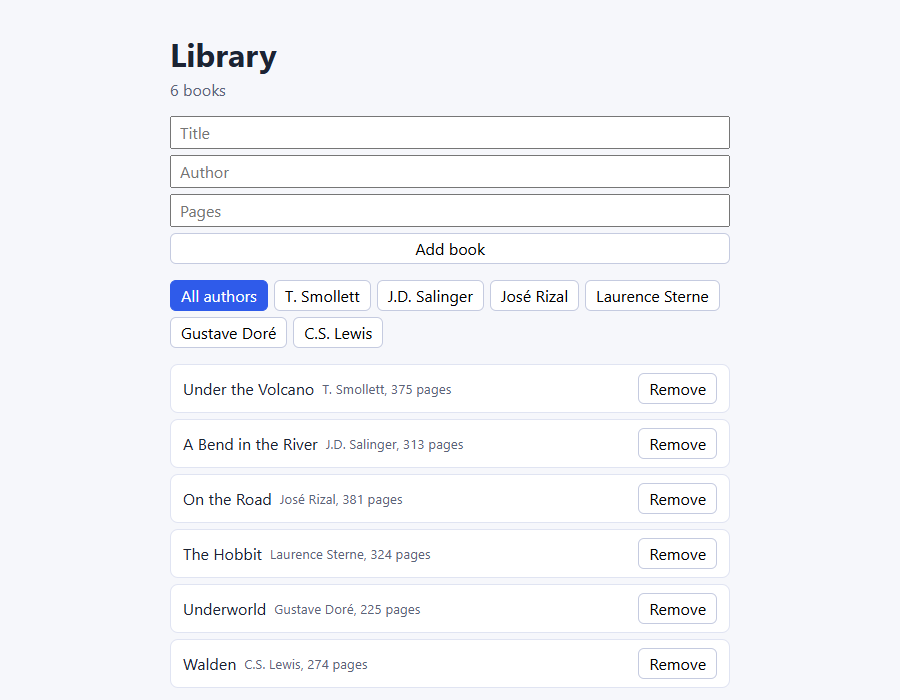
dev and dev:real
  "scripts": {
    "api": "orval",
    "dev": "vite",
    "dev:real": "vite --mode real",
    "build": "tsc -b && vite build",
    "preview": "vite preview"
  },
# mocks off: requests go through the dev proxy to the real API
VITE_MOCKS=offnpm run dev loads .env.development: mocks on, six books, fromServiceWorker: true. npm run dev:real runs Vite with --mode real, which loads .env.real: mocks off, no worker at all. The same GET goes through the dev proxy to port 8080:
PASS B (npm run dev:real, API running): GET /api/books requests = 1 | fromServiceWorker: false | status 200
console lines with [MSW]: []
page text: Library | 12 books
Not one line of BookList changed between the two. Only the one who answers changed.
No mock code in the bundle
In a production build DEV is false, so the if on line 14 is always false and the block, with its dynamic import, is left out. The run searched the built bundle for setupWorker, mockServiceWorker and faker:
production bundle contains the mock code? falsemockServiceWorker.js is still copied from public/ as a plain file, but nothing registers it, so it never runs.
Common mistakes
- The worker file is missing from public/. The dev server sends back an HTML page instead of the script, the console says
[MSW] Failed to register the Service Worker,worker.start()throws, and the page stays empty. - Rendering before worker.start() finishes. The first request can slip past the mock.
- No seed. The fake list changes on every reload, which makes screens hard to compare.
Quick recap
| Piece | Job |
|---|---|
| Service worker | Catches every request inside the browser |
mock: true in Orval | Writes the handlers and faker data from the spec |
http.get('*/api/books') | Matches the request and returns the answer |
await worker.start() | Dev only, before the first render |
dev / dev:real | Changes who answers, never the app code |
npm run build | No mock code in the bundle |
StudyEasy AI Community

Learn AI engineering, share what you build, and connect with other learners.
Free resources: lesson files, notebooks and code
Ask questions and join engineering discussions
Meet real people learning and building with AI
Related course on Udemy
The Python Architect Masterclass: Full Stack to AI Engineer
Python, Django, FastAPI, React, Docker, AWS, LLMs, RAG, agents and MCP, from first steps to AI engineer.View on Udemy ↗: The Python Architect Masterclass: Full Stack to AI Engineer (paid course, opens in a new tab)Related posts
Server State With TanStack Query: One Key, One Request, One Cache
Three components need the same list of books. Fetch it by hand and you get three requests; ask TanStack Query for one key and you get one. With real request counts, retries and a quiet refetch on tab focus.
Mutations and Optimistic Updates in TanStack Query: Change Data, Then Tell the Cache
Add a book with useMutation and let invalidateQueries refetch the list, then make delete instant: snapshot, remove the row in 3 ms, roll back on a 404 and refetch the truth in onSettled.
Generate TypeScript Types, Query Hooks and Zod From an OpenAPI Spec With Orval
Let the API's OpenAPI spec write your React client: Orval turns /v3/api-docs into TypeScript types, useGetBooks and a Zod schema, and a renamed field becomes error TS2339 at BookList.tsx line 26.
A React Client for a FastAPI API: The CORS Wall, CORSMiddleware and the Vite Proxy
Generate a React client from FastAPI's /openapi.json, then hit the CORS wall: the API answers 200 but the browser blocks it. Fix it with CORSMiddleware, or avoid it with the Vite proxy and one VITE_API_URL variable.