
MLflow Model Registry Aliases: Serve the Champion, Ship a New Version and Roll Back in One Line
Ship a new model without touching the API: an MLflow alias called champion points at a registry version, a FastAPI service loads whatever it points at, version 2 goes live by moving the label, and one command rolls it back to version 1.
What you will learn
- Load a registered model by alias (@champion) instead of a fixed version number
- Explain why aliases replace the deprecated registry stages
- Make a FastAPI service load the champion at start-up and report its version in every answer
- Promote a new version and roll it back by moving the alias, with no code change
Before you start
- Experiment Tracking with MLflow
- Deploy a Machine Learning Model with FastAPI
In Experiment Tracking with MLflow we loaded a model by its number: models:/ticket-priority/1. That works, but the number lives in your code. A new model means editing the code, testing it and shipping it again.
This article fixes that. We'll ship a new model without changing the API, and if the new model turns out badly, we'll take it back with one line. Same ticket-priority project, same synthetic tickets, MLflow 3.17.2.
A hotel key desk
Picture a hotel. The staff ask the key desk for room 12's key. The desk looks at its board and hands over key A.
Now the lock gets changed. The desk updates its board to key B. The staff ask in exactly the same way and get the new key. They never learn a key number. And if key B jams? The desk changes one entry on the board, back to key A.
Room 12 is our champion, the desk is the registry, and a key is a model version. Change what the desk hands out, and nobody else has to change.
Two ways to name a model
A number names one model forever. An alias is a name you put on a version, and you can move it later. Today @champion means version 1; tomorrow it can mean version 2.
load_and_predict.py accepts either form:
"""Load by number or by alias: python load_and_predict.py 1 or @champion"""
import json
import sys

import mlflow.sklearn
import pandas as pd

import tracking

tracking.setup()
ref = sys.argv[1] if len(sys.argv) > 1 else "@champion"
where = ref if ref.startswith("@") else f"/{ref}"
uri = f"models:/{tracking.MODEL_NAME}{where}"
model = mlflow.sklearn.load_model(uri)

with open("ticket.json") as f:
    row = pd.DataFrame([json.load(f)])
print(f"{uri}  p_high={model.predict_proba(row)[0, 1]:.3f}")
Same ticket, loaded both ways:
models:/ticket-priority/1  p_high=0.424
models:/ticket-priority@champion  p_high=0.424
0.424 both times. It's the same model.
Stages are on the way out, aliases are in
Many tutorials use stages: fixed boxes like Staging and Production, and a version moves from box to box. Calling that API on MLflow 3.17 gives a warning:
FutureWarning: ``mlflow.tracking.client.MlflowClient.transition_model_version_stage`` is deprecated since 2.9.0. Model registry stages will be removed in a future major release.The stage call still runs, but new code should use aliases. You pick the name and put it on a version. Two rules:
- One alias points at one version.
- One version can wear several aliases.
Put the label on version 1
First, python register_best.py registers the best run as version 1 (C = 10, F1 0.6504). Then:
"""Point an alias at a version: python set_alias.py champion 2"""
import sys

from mlflow import MlflowClient

import tracking

tracking.setup()
alias, version = sys.argv[1], sys.argv[2]
client = MlflowClient()
client.set_registered_model_alias(tracking.MODEL_NAME, alias, version)
print(f"{alias} -> version {version}")
python set_alias.py champion 1champion -> version 1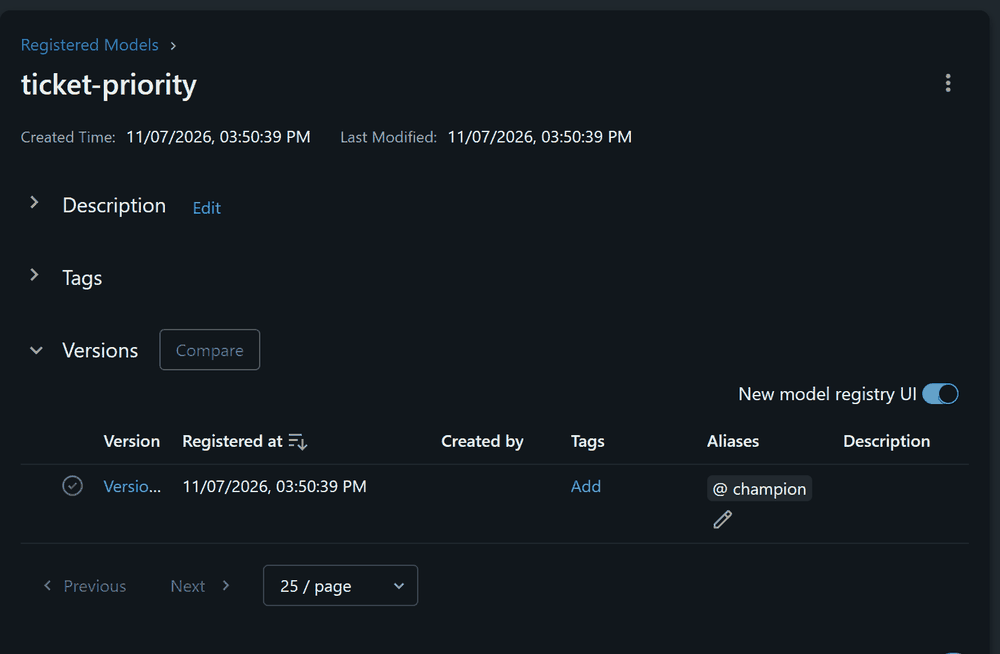
What did that do? Inside MLflow's database it's one row in a table: model name, alias, version number.
[('ticket-priority', 'champion', 1)]An alias is one row. The model itself isn't touched.
The service asks for the champion at start-up
Now the API. FastAPI itself is covered in Deploy a Machine Learning Model with FastAPI; here we only care about how the model gets picked.
"""Serve whichever version the champion alias points at."""
import logging

import mlflow.sklearn
import pandas as pd
from fastapi import FastAPI
from mlflow import MlflowClient
from pydantic import BaseModel

import tracking

log = logging.getLogger("uvicorn.error")
tracking.setup()
client = MlflowClient()
app = FastAPI(title="Ticket Priority")


def load_champion():
    name = tracking.MODEL_NAME
    version = client.get_model_version_by_alias(name, "champion").version
    model = mlflow.sklearn.load_model(f"models:/{name}/{version}")
    log.info("loaded champion, version %s", version)
    return model, version


current = load_champion()   # runs once, when the server starts


class Ticket(BaseModel):
    channel: str
    customer_tier: str
    product_area: str
    words: int
    has_attachment: int
    previous_tickets: int
    hour: int
    sentiment: float


@app.post("/predict")
def predict(ticket: Ticket):
    model, version = current
    row = pd.DataFrame([ticket.model_dump()])
    p_high = float(model.predict_proba(row)[0, 1])
    return {"priority": "high" if p_high >= 0.5 else "low",
            "p_high": round(p_high, 3), "version": version}


@app.post("/reload")
def reload():
    global current
    current = load_champion()
    return {"version": current[1]}
load_champion asks the registry get_model_version_by_alias: champion goes in, the number 1 comes back. Then it loads that exact number. We ask once, so the version we report is always the one we loaded. Both are kept together in current.
python -m uvicorn app:app --port 8000INFO: loaded champion, version 1
INFO: Started server process [34100]
INFO: Waiting for application startup.
INFO: Application startup complete.And if nobody has set the alias yet? The server stops at start-up:
mlflow.exceptions.MlflowException: Registered model alias champion not found.It fails loudly, and that's good. The code says champion; it never says a number.
Every answer names its version
python ask.py posts a borderline ticket from ticket.json to /predict:
{"priority":"low","p_high":0.424,"version":1}0.424 is under one half, so it's low. Look at what comes back: the priority, the probability and the version. If an answer ever looks wrong, you know exactly which model gave it.
Version 2 arrives, and the API doesn't notice
train_candidate.py trains a candidate with the same settings, except a high ticket counts double while it learns: class_weight={0: 1, 1: 2}.
high x2 accuracy=0.6420 f1=0.6832F1 rises from 0.6504 to 0.6832. Run register_best.py again and it becomes version 2:
best run: logreg-high-x2  C=10.0  f1=0.6832
registered 'ticket-priority' as version 2
The label stays on version 1, and the API still answers "version":1. Registering a model deploys nothing. A new version only sits on the shelf until you move the label.
Move the label, then reload
python set_alias.py champion 2
python ask.py
champion -> version 2
{"priority":"low","p_high":0.424,"version":1}No code file changed, but the answer still says version 1. Why? The server loaded its model at start-up and is holding it in memory. It's the staff member with yesterday's key in their pocket. It has to go back to the desk:
python ask.py reload
python ask.py{"version":2}
{"priority":"high","p_high":0.6,"version":2}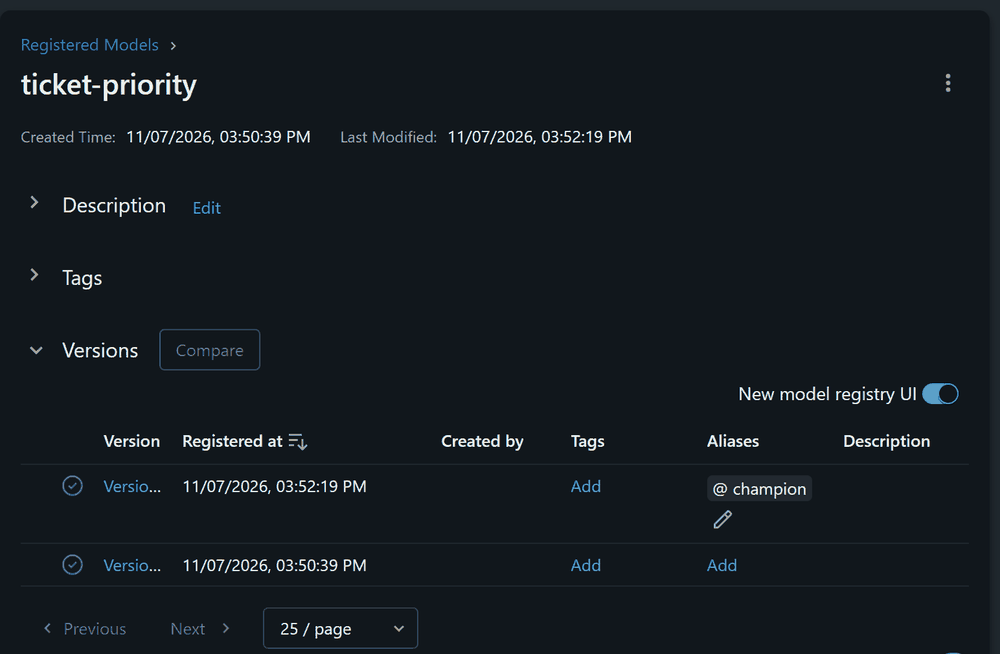
set_alias.py champion 2, the label sits on version 2. Version 1 is still on the shelf.Same code, same process, a new model: the same ticket now says high, 0.6, version 2. A restart does the same job; it took several seconds here, against under a second for /reload. Our /reload has no login, so in a real service, protect it or just restart.
Rollback is one line
Now suppose the support team comes back: nearly everything is marked urgent. Load both versions by number and score them on the same test tickets:
python compare_versions.py 1 2really high in the test set: 45.8%
version 1 accuracy=0.6840 f1=0.6504 flagged high=44.6%
version 2 accuracy=0.6420 f1=0.6832 flagged high=67.2%About 46% of tickets are really high. Version 1 flags 45%, version 2 flags 67%. Its F1 went up, but its accuracy fell. And it isn't luck: across 20 data splits, the weighting flagged more tickets in 20 of 20, raised F1 in 19 and lowered accuracy in 19. F1 likes it; the support queue doesn't.
python set_alias.py champion 1
python ask.py reload
python ask.py
champion -> version 1
{"version":1}
{"priority":"low","p_high":0.424,"version":1}Nothing retrained, no code touched, and version 2 is still on the shelf if you want it later.
Common mistakes
- Hard-coding a version number in the service. Every new model becomes a code change. Ask for an alias.
- Expecting registration to deploy. It doesn't. Only moving the alias changes what the service will load.
- Forgetting the running process. A server that loaded at start-up keeps its old model until it reloads or restarts.
- Leaving
/reloadopen. Anyone who can reach it can force the service to re-read the alias. Protect it, or restart instead. - Writing new code with stages. They're deprecated since MLflow 2.9.0.
Recap
| Step | Command | Result |
|---|---|---|
| Label version 1 | set_alias.py champion 1 | API serves v1, ticket low 0.424 |
| Register a candidate | train_candidate.py, register_best.py | v2 on the shelf, API still v1 |
| Promote | set_alias.py champion 2 + reload | ticket high 0.6, version 2 |
| Roll back | set_alias.py champion 1 + reload | ticket low 0.424, version 1 |
A version is a number that stays fixed. The champion is a label that moves. Ship a name, not a number.
Try it yourself
Point a second alias, challenger, at version 2 with python set_alias.py challenger 2, then load it with python load_and_predict.py @challenger. Open the registry page and check that version 1 still wears @champion.
Built this? Share your solution in the StudyEasy AI Community.
Join free on Skool →Experiment Tracking with MLflow: Log Params, Metrics and the Model, Then Compare Runs
Next →The Cost of Being Wrong: Baselines, a Price per Mistake and the Cheapest Threshold
StudyEasy AI Community

Learn AI engineering, share what you build, and connect with other learners.
Free resources: lesson files, notebooks and code
Ask questions and join engineering discussions
Meet real people learning and building with AI
Machine Learning Engineer: From First Model to ML Engineer
Learn machine learning in Python, then ship it: data analysis, regression, classification, tuning, deployment and MLOps.View on Udemy ↗: Machine Learning Engineer: From First Model to ML Engineer (opens in a new tab)Related articles
Python Virtual Environments: One Project, One Toolbox
Why every Python project gets its own virtual environment: two projects that need different versions of requests, python -m venv .venv, activation, pip install and the PyCharm setting that activates it for you.
Git and GitHub Fundamentals: Commits, Branches, Push and Pull
The Git you use every day, on a tiny hello-ml project: commits as save points, the staging area, a branch merged with a fast-forward, then push, clone, pull and pull requests with a teammate.
Testing a FastAPI App with pytest: Three Small Tests
A tiny FastAPI app with a Hello World route and a name route that refuses numbers, three pytest tests that check it, and what happens when the validation is deleted by mistake.
Config and Logging Instead of Hard-Coded Values in ML Training
Take the hard-coded values out of a car price training script: one config.toml read with tomllib, logging with levels and a run id on every line, and secrets read from the environment. Same RMSE, 2195, before and after.