
Learning path: Ship Your First Model: From Notebook to a FastAPI Service · Step 3 of 9
Deploy a Machine Learning Model with FastAPI: POST /predict for a Saved Model
Put the saved rain model behind a web address: load model.joblib once, check five inputs with a Pydantic class, answer POST /predict with Yes and 0.63, and watch a bad value get a 422 before the model ever runs.
What you will learn
- Load a saved joblib pipeline once when a FastAPI server starts
- Describe the model's inputs with a Pydantic class, using Literal for fixed choices
- Write a POST /predict route that turns the request into a one-row DataFrame and returns the answer and its probability
- Read a 422 response and explain why bad data never reaches the model
Before you start
- Saving and Loading Models with joblib
- FastAPI Hello World
We have two pieces already. The rain model, saved in one file, model.joblib. And a small FastAPI app, main.py. Now we put them in one project folder and add one new route, POST /predict: a day comes in, the model answers, and JSON goes back.
That's what deploying means here. The model sits behind a web address, and anyone can ask it.
The project: three files
The folder holds main.py, model.joblib (copied from the saving step without any change, 4,298 bytes) and requirements.txt, which now has six lines:
fastapi==0.162.0
uvicorn==0.54.0
scikit-learn==1.9.1
pandas==3.0.6
numpy==2.5.3
joblib==1.6.0
FastAPI and uvicorn for the server. scikit-learn, pandas, numpy and joblib for the model, at the same versions we pinned when we saved it. A saved model is only safe with the same versions. Install with pip install -r requirements.txt.
main.py, the whole file
from typing import Literal

import joblib
import pandas as pd
from fastapi import FastAPI
from pydantic import BaseModel

app = FastAPI(title="Rain Predictor")
model = joblib.load("model.joblib")


class Weather(BaseModel):
    Rainfall: float
    Humidity3pm: float
    Cloud9am: float
    Cloud3pm: float
    RainToday: Literal["Yes", "No"]


@app.get("/")
def home():
    return {"message": "Rain Predictor is running"}


@app.post("/predict")
def predict(day: Weather):
    row = pd.DataFrame([day.model_dump()])
    answer = model.predict(row)[0]
    chance = model.predict_proba(row)[0][1]
    return {"rain_tomorrow": answer,
            "probability": round(float(chance), 2)}
Let's take it in three parts.
Load the model once
model = joblib.load("model.joblib") sits at the top level of the file, so it runs one time, when the server starts. After that, every request uses the same pipeline that's already in memory. We don't load the file again and again on each request.
Pydantic checks the order
Weather extends BaseModel and lists the five inputs the model learned from, with the same names as the training columns. The first four must be numbers. RainToday can only be "Yes" or "No"; that's what Literal means. Pydantic checks every request against this class before your function runs. (For more on request and response models, see FastAPI request and response models with Pydantic.)
The predict route
@app.post("/predict") uses POST because the request carries data in its body. The parameter day: Weather tells FastAPI to read the JSON body and check it with Weather.
Remember, even one day must be a table. day.model_dump() turns the checked object into a dictionary, and pd.DataFrame([...]) makes a one-row DataFrame, shape (1, 5). Then predict gives the answer, predict_proba(row)[0][1] gives the chance of the second class, Yes, and we return both in a dictionary. float(...) turns the NumPy number into a plain Python float before rounding. The model does the work, and FastAPI carries the data in and out.
Start the server
python -m uvicorn main:app --port 8000INFO: Started server process [35448]
INFO: Waiting for application startup.
INFO: Application startup complete.
INFO: Uvicorn running on http://127.0.0.1:8000 (Press CTRL+C to quit)While it starts, the joblib.load line runs, so the model is ready before the first request. Now the model is waiting at a web address.
Follow one prediction
A request comes in to POST /predict with today's weather as JSON:
{"Rainfall": 0.0, "Humidity3pm": 85, "Cloud9am": 7, "Cloud3pm": 8, "RainToday": "No"}uvicorn takes it, Pydantic checks all five values, the function builds the one-row table and the model predicts. The response:
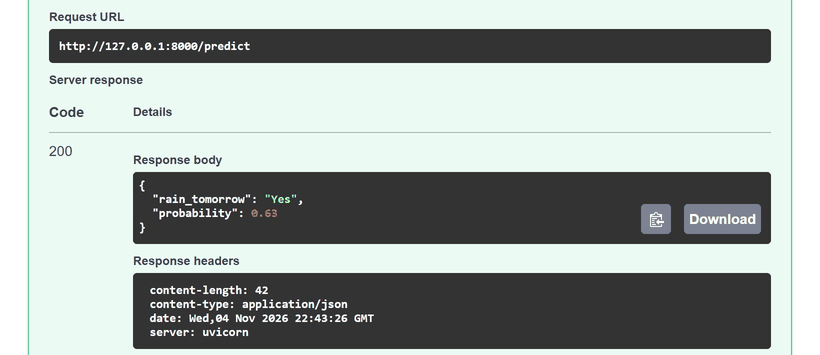
200 {"rain_tomorrow":"Yes","probability":0.63}INFO: 127.0.0.1:54395 - "POST /predict HTTP/1.1" 200 OKIt's the same answer the notebook gave for this day: Yes, with 63%. Only now it came over the web.
Try it on /docs
You don't need any extra tool to test this. Open http://127.0.0.1:8000/docs, and both routes are already there. Open POST /predict and click Try it out. FastAPI built this form from the Weather class, so the request body already lists the five fields. Type today's values:
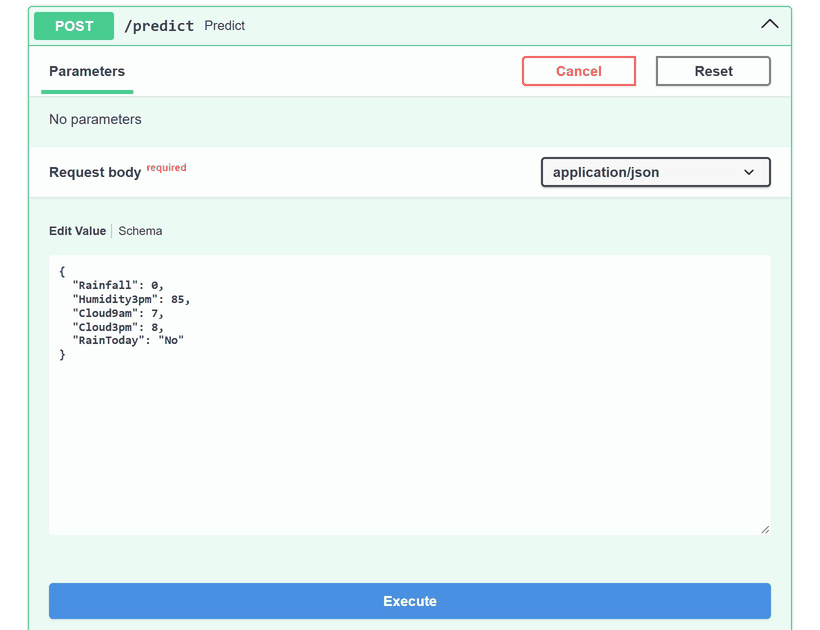
Click Execute, and the page sends the request:
A bad order gets 422
What if someone sends bad data? Here Humidity3pm is the word "high" instead of a number. Pydantic stops it right at the check:
422 {"detail":[{"type":"float_parsing","loc":["body","Humidity3pm"],"msg":"Input should be a valid number, unable to parse string as a number","input":"high"}]}INFO: 127.0.0.1:54397 - "POST /predict HTTP/1.1" 422 Unprocessable ContentThe response names the exact field, ["body", "Humidity3pm"], and says what's wrong. The predict function never ran, so bad data can't reach the model.
And a good request still works. A dry day (Rainfall 0, Humidity3pm 30, Cloud9am 1, Cloud3pm 2, RainToday "No"):
200 {"rain_tomorrow":"No","probability":0.03}Bad data stops at the door, and good data gets an answer.
Common mistakes
- Loading the model inside the route. Then every request reads the file from disk again. Load it once at the top of the file.
- Field names that don't match the training columns. The pipeline picks its columns by name, so the
Weatherfields must be spelled exactly likeHumidity3pm,Cloud9amand the rest. - Passing the dictionary straight to
predict. The pipeline expects a table with named columns, so wrap it in a one-row DataFrame first. - Different library versions on the server. Install from the same pinned
requirements.txtyou saved the model with. - Starting uvicorn from another folder.
joblib.load("model.joblib")uses a relative path, so start the server from the project folder where the file sits.
Quick recap
| Line | Job | Real result |
|---|---|---|
model = joblib.load(...) | Load the pipeline once, at startup | ready before the first request |
class Weather(BaseModel) | Check the five inputs | "high" for a number gets 422 |
@app.post("/predict") | One-row DataFrame, predict, predict_proba | today: Yes, 0.63; dry day: No, 0.03 |
/docs | Try the route with no code | 200 with the same answer |
Try it yourself
Send the dry day from /docs and check you get No with 0.03. Then send your own numbers, and one request with "RainToday": "Maybe". What does the 422 say this time?
Built this? Share your solution in the StudyEasy AI Community.
Join free on Skool →FastAPI Hello World: Routes, uvicorn and the Free Swagger Page
Next →Project: Car Price Predictor End to End, from CSV to a FastAPI Price API
StudyEasy AI Community

Learn AI engineering, share what you build, and connect with other learners.
Free resources: lesson files, notebooks and code
Ask questions and join engineering discussions
Meet real people learning and building with AI
Machine Learning Engineer: From First Model to ML Engineer
Learn machine learning in Python, then ship it: data analysis, regression, classification, tuning, deployment and MLOps.View on Udemy ↗: Machine Learning Engineer: From First Model to ML Engineer (opens in a new tab)Related articles
Python Virtual Environments: One Project, One Toolbox
Why every Python project gets its own virtual environment: two projects that need different versions of requests, python -m venv .venv, activation, pip install and the PyCharm setting that activates it for you.
Git and GitHub Fundamentals: Commits, Branches, Push and Pull
The Git you use every day, on a tiny hello-ml project: commits as save points, the staging area, a branch merged with a fast-forward, then push, clone, pull and pull requests with a teammate.
Testing a FastAPI App with pytest: Three Small Tests
A tiny FastAPI app with a Hello World route and a name route that refuses numbers, three pytest tests that check it, and what happens when the validation is deleted by mistake.
Config and Logging Instead of Hard-Coded Values in ML Training
Take the hard-coded values out of a car price training script: one config.toml read with tomllib, logging with levels and a run id on every line, and secrets read from the environment. Same RMSE, 2195, before and after.