
Experiment Tracking with MLflow: Log Params, Metrics and the Model, Then Compare Runs
Make every training run leave a record: MLflow logs the settings, the scores and the whole pipeline for three values of C on a ticket-priority model, then the UI compares them, 20 re-splits test whether the 0.0108 gap is real, and the best run becomes version 1.
What you will learn
- Point MLflow at a local SQLite file and an artifacts folder, with no server
- Log params, metrics and a whole scikit-learn pipeline for every training run
- Compare runs in the MLflow UI and judge whether a small gap is real
- Register the best run and load it back by name and version
Before you start
- Pipelines and ColumnTransformer
- MLOps in One Picture
You try a few settings, look at a score, and an hour later you can't say which setting gave it. That's a very common problem. In this article our training code will leave a record behind: the settings, the scores and the model itself, for every run. The tool for the job is MLflow.
The project is a ticket-priority model: it reads a support ticket and predicts whether its priority is high. The tickets are generated sample data (2,000 rows), so they're fine to play with.
A lab notebook, not loose notes
Imagine you try three settings for your model and write each on a sticky note: C = 0.1, C = 1 and C = 10. A week later someone asks which one was best. Nobody wrote it down, or the scores never made it onto the notes.
Now picture a lab notebook. Every experiment gets its own line with the settings, the score and a tick that says the model is saved. The best one is right there, and you can repeat it. MLflow is that lab notebook, and the code writes each line, not you.
tracking.py: where MLflow keeps everything
One small helper says where things are kept. Every script calls it.
"""One place that says where MLflow keeps its data: inside this folder, offline."""
import os
from pathlib import Path

import mlflow

HERE = Path(__file__).parent
# Docker sets MLFLOW_STORE_DIR to a shared volume
STORE = Path(os.environ.get("MLFLOW_STORE_DIR", HERE))
TRACKING_URI = f"sqlite:///{(STORE / 'mlflow.db').as_posix()}"
ARTIFACTS = (STORE / "mlartifacts").as_uri()
EXPERIMENT = "ticket-priority"
MODEL_NAME = "ticket-priority"


def setup():
    mlflow.set_tracking_uri(TRACKING_URI)
    mlflow.set_registry_uri(TRACKING_URI)
    if mlflow.get_experiment_by_name(EXPERIMENT) is None:
        mlflow.create_experiment(EXPERIMENT, artifact_location=ARTIFACTS)
mlflow.set_experiment(EXPERIMENT)- The tracking URI starts with
sqlite, so the "notebook" is one SQLite file,mlflow.db. Settings and scores go in there. - The artifacts folder,
mlartifacts, is the shelf where saved models go. setup()points MLflow at that file, creates the experimentticket-priorityif it isn't there yet, and selects it. An experiment is just the folder of runs that belong together.
Both live in the project folder. No server to start, no account to make, and it all works offline. (The MLFLOW_STORE_DIR line only matters when the project runs in Docker; on your machine it falls back to the project folder.)
train.py: each pass of the loop writes one run
"""Train the ticket model with three settings of C and log every run to MLflow."""
import mlflow
import mlflow.sklearn
from sklearn.linear_model import LogisticRegression
from sklearn.metrics import accuracy_score, f1_score

import features
import tracking

tracking.setup()
X_train, X_test, y_train, y_test = features.load()

for c in (0.1, 1.0, 10.0):
    with mlflow.start_run(run_name=f"logreg-C{c}"):
        model = LogisticRegression(C=c, max_iter=1000)
        pipe = features.make_pipeline(model)
        pipe.fit(X_train, y_train)
        pred = pipe.predict(X_test)
        acc = accuracy_score(y_test, pred)
        f1 = f1_score(y_test, pred)

        mlflow.log_param("model", "LogisticRegression")
        mlflow.log_param("C", c)
        mlflow.log_metric("accuracy", acc)
        mlflow.log_metric("f1", f1)
        mlflow.sklearn.log_model(pipe, name="model")
        print(f"C={c:<5} accuracy={acc:.4f}  f1={f1:.4f}")
For each value of C, with mlflow.start_run(...) opens a new run, named after the setting. Inside, it's the usual work: build, fit, predict, score. Then:
log_paramwrites the settings, the things you choose: the model name and C.log_metricwrites the scores, the things you measure: accuracy and F1.mlflow.sklearn.log_modelsaves the model. When thewithblock ends, the run is closed and marked finished.
The whole pipeline goes on the shelf
pipe isn't only the logistic regression. features.make_pipeline builds a one-hot step for the three text columns (channel, customer_tier, product_area), passes the five number columns straight through, and then adds the model (see Pipelines and ColumnTransformer). So log_model saves the whole pipeline, under the name model.
It lands in mlartifacts as five files: MLmodel (says what it is), conda.yaml and python_env.yaml (the environment), requirements.txt (the library versions) and model.skops, the fitted pipeline itself, about 102 KB. Because the one-hot step is inside, whoever loads it later doesn't need to rebuild anything.
Run it
python train.pyC=0.1 accuracy=0.6800 f1=0.6396
C=1.0 accuracy=0.6820 f1=0.6475
C=10.0 accuracy=0.6840 f1=0.6504A warning from MLflow about the torch version may scroll by. It's only about library versions and it's harmless. Saving a model takes a few seconds, so each run took around 17 to 25 seconds here. The project folder now has two new things: mlflow.db and mlartifacts/. The scores are on screen, and the record is in the database.
Compare the runs in the MLflow UI
mlflow ui --backend-store-uri sqlite:///mlflow.dbOpen http://127.0.0.1:5000 and you'll see three runs, newest first. The metric columns are optional, so open Columns and tick accuracy, f1 and C. Now the table is a comparison. Sort it by F1:
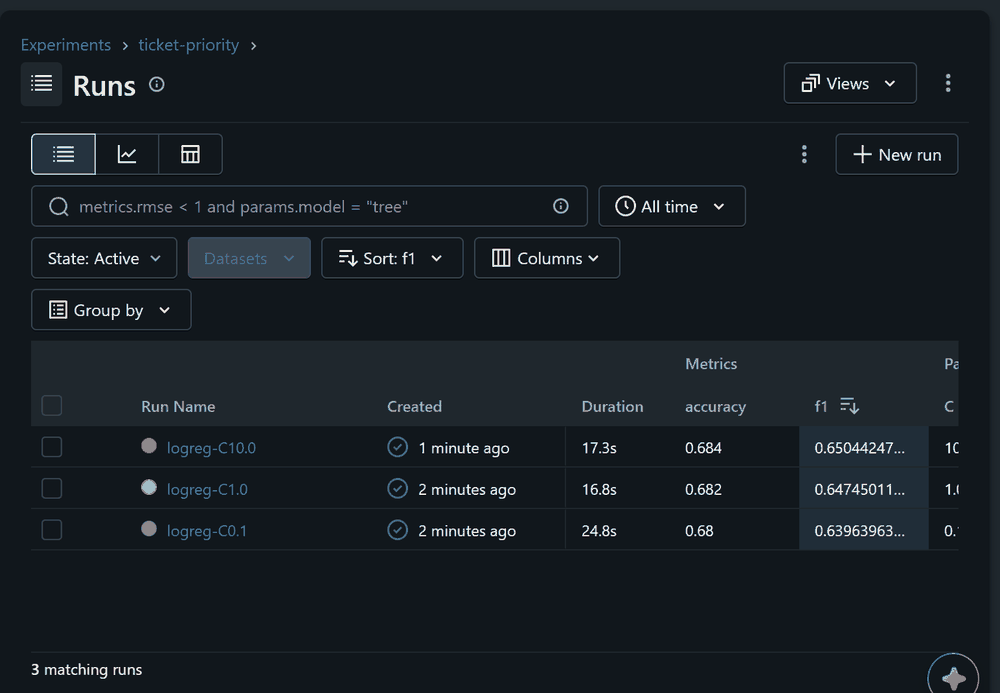
logreg-C10.0 comes out on top at 0.6504. But look at the gap between best and worst: only 0.0108.
A few more views are worth knowing. The chart view draws a bar per run; the bars start at zero so they look almost the same, which is why you read the numbers and not only the bars. Tick runs and click Compare to plot C against F1. Click a run's name to see its two params, two metrics, its status and duration, and an Artifacts tab with the five model files. The logged model also has its own page under Models, which says it isn't registered yet.
Is a gap of 0.0108 real?
It's easy to fool yourself here, so let's check. The same 2,000 tickets were split 20 other ways (seeds 0 to 19), and all three settings were trained every time.
- The F1 for one setting moved from about 0.57 to about 0.68, just by changing the split.
- Within any single split, the three settings differed by at most 0.0162.
- C = 10 was best, or tied for best, in 13 of the 20 splits.
So the split moves the score much more than C does. C = 10 isn't a bad choice, but a small gap is a note, not a verdict. That's exactly why you keep the record.
Register the best run
"""Find the run with the best f1 and register its model as 'ticket-priority'."""
import mlflow

import tracking

tracking.setup()
runs = mlflow.search_runs(
    experiment_names=[tracking.EXPERIMENT],
    order_by=["metrics.f1 DESC"],
)
best = runs.iloc[0]
name = best["tags.mlflow.runName"]
c, f1 = best["params.C"], best["metrics.f1"]
print(f"best run: {name}  C={c}  f1={f1:.4f}")

uri = f"runs:/{best['run_id']}/model"
result = mlflow.register_model(uri, tracking.MODEL_NAME)
print(f"registered '{result.name}' as version {result.version}")
best run: logreg-C10.0 C=10.0 f1=0.6504
registered 'ticket-priority' as version 1search_runs returns the experiment's runs as a table, ordered by F1, highest first. The first row is the best run. register_model takes the address of that run's model and a name, and creates version 1. A warning line may appear here too; it's harmless.
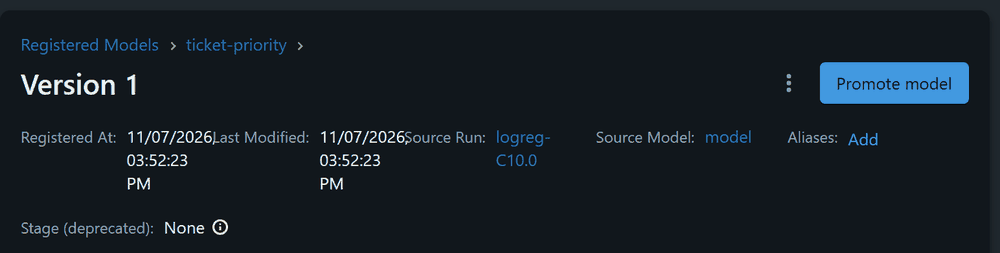
Version 1 still knows which run made it, so its settings and score are one click away.
Load it by name and version
"""Load a registered model by name and version, then predict two tickets."""
import sys

import mlflow.sklearn
import pandas as pd

import tracking

tracking.setup()
version = sys.argv[1] if len(sys.argv) > 1 else "1"
uri = f"models:/{tracking.MODEL_NAME}/{version}"
model = mlflow.sklearn.load_model(uri)

tickets = pd.DataFrame([
    {"channel": "phone", "customer_tier": "enterprise",
     "product_area": "billing", "words": 140, "has_attachment": 1,
     "previous_tickets": 6, "hour": 23, "sentiment": -0.8},
    {"channel": "email", "customer_tier": "free",
     "product_area": "login", "words": 20, "has_attachment": 0,
     "previous_tickets": 0, "hour": 10, "sentiment": 0.6},
])
proba = model.predict_proba(tickets)[:, 1]
for row, p in zip(tickets.itertuples(), proba):
    label = "high" if p >= 0.5 else "low"
    name = f"{row.channel}/{row.customer_tier}/{row.product_area}"
    print(f"{name}: {label} (p_high={p:.3f})")
phone/enterprise/billing: high (p_high=0.985)
email/free/login: low (p_high=0.149)Look at the address: models:/ticket-priority/1. No run ID in the code, no C. Only a name and a version. That one line loads the whole pipeline, one-hot step included. Pass a different number to the script and you get a different version. The loading code never changes; the version number says which model.
Hard-coding that number has a cost, though: a new model means editing code. The next article swaps the number for a movable label: Model Registry Aliases, the Champion and Rollback.
Common mistakes
- Logging the score but not the settings. A metric without its params can't be repeated. Log both in the same run.
- Saving only the estimator. Log the whole pipeline, or the loader has to rebuild the one-hot step by hand.
- Crowning a winner on a tiny gap. 0.0108 was smaller than the swing from one split to another. Re-split before you believe it.
- Panicking at the warnings. The torch version warning and the registration warning are informational.
Recap
| Call | What it records | In this project |
|---|---|---|
log_param | settings you choose | model, C |
log_metric | scores you measure | accuracy, f1 |
mlflow.sklearn.log_model | the whole fitted pipeline | five files, model.skops about 102 KB |
search_runs + register_model | the best run, as a named version | ticket-priority version 1 (C = 10, F1 0.6504) |
models:/name/version | load by name, not run ID | models:/ticket-priority/1 |
Try it yourself
Add mlflow.log_param("max_iter", 1000) to train.py and run it again. Find max_iter in the Columns list, run register_best.py again, and load the new version with python load_and_predict.py 2.
Built this? Share your solution in the StudyEasy AI Community.
Join free on Skool →MLOps in One Picture: Code, Data, Model and the Lifecycle Loop
Next →MLflow Model Registry Aliases: Serve the Champion, Ship a New Version and Roll Back in One Line
StudyEasy AI Community

Learn AI engineering, share what you build, and connect with other learners.
Free resources: lesson files, notebooks and code
Ask questions and join engineering discussions
Meet real people learning and building with AI
Machine Learning Engineer: From First Model to ML Engineer
Learn machine learning in Python, then ship it: data analysis, regression, classification, tuning, deployment and MLOps.View on Udemy ↗: Machine Learning Engineer: From First Model to ML Engineer (opens in a new tab)Related articles
Python Virtual Environments: One Project, One Toolbox
Why every Python project gets its own virtual environment: two projects that need different versions of requests, python -m venv .venv, activation, pip install and the PyCharm setting that activates it for you.
Git and GitHub Fundamentals: Commits, Branches, Push and Pull
The Git you use every day, on a tiny hello-ml project: commits as save points, the staging area, a branch merged with a fast-forward, then push, clone, pull and pull requests with a teammate.
Testing a FastAPI App with pytest: Three Small Tests
A tiny FastAPI app with a Hello World route and a name route that refuses numbers, three pytest tests that check it, and what happens when the validation is deleted by mistake.
Config and Logging Instead of Hard-Coded Values in ML Training
Take the hard-coded values out of a car price training script: one config.toml read with tomllib, logging with levels and a run id on every line, and secrets read from the environment. Same RMSE, 2195, before and after.