
Learning path: Ship Your First Model: From Notebook to a FastAPI Service · Step 2 of 9
FastAPI Hello World: Routes, uvicorn and the Free Swagger Page
The smallest FastAPI app: two routes in main.py, started with uvicorn. Follow one request from the browser to the route table and back as JSON, see a 404, and try the routes on the free Swagger page at /docs.
What you will learn
- Explain what an API is and why a saved model file needs a server in front of it
- Write a FastAPI app with two GET routes, one with a path parameter
- Start it with uvicorn and follow one request from URL to route to function to JSON
- Test routes without code on the Swagger UI page at /docs
Before you start
- Basic Python: functions and dictionaries
- Installing packages with pip
You've saved a model in a file. On one side there's an app, like a phone app or a website, and on the other side there's model.joblib. The app has a question. But a file just sits on the disk. It can't answer anyone.
So we put a server in between: a small program that waits at a web address. The app sends it a request, and the server sends back a response, as JSON. A web address that answers requests like this is called an API. That's all the word means.
Before we put a model behind it, let's get to know FastAPI on its own, with nothing else in the way.
Four layers, top to bottom
Three names to know:
- FastAPI is a Python framework where a plain function can answer a web request. Its docs live on the official site, fastapi.tiangolo.com.
- uvicorn is its partner: the server that listens and passes requests in.
- Pydantic checks data. It installs along with FastAPI, and we don't need it yet.
The project: two files
The whole project is a folder with main.py (the app) and requirements.txt:
fastapi==0.162.0
uvicorn==0.54.0
Install both in your virtual environment:
pip install -r requirements.txtPydantic, Starlette and a few others come along with them (the real run installed pydantic-2.14.2 and starlette-1.10.0, among others).
main.py: a decorator adds a route
from fastapi import FastAPI

app = FastAPI(title="Hello API")


@app.get("/")
def home():
    return {"message": "Hello World"}


@app.get("/hello/{name}")
def hello(name: str):
    return {"message": f"Hello {name}"}
Line by line:
app = FastAPI(title="Hello API")makes one object calledapp. It holds everything.@app.get("/")is a decorator, and here's the idea that matters: it writes one line into the app's route table. A GET on/goes to the functionhome.homeitself is plain Python. It returns a dictionary.- The second route is the same idea: GET
/hello/{name}goes tohello.
So each @app.get writes one line in the route table.
Start the server
So far this is only a file. In the terminal, from the project folder:
python -m uvicorn main:app --port 8000main is the file main.py, app is the object inside it, and 8000 is the door number (the port).
INFO:     Started server process [27316]
INFO:     Waiting for application startup.
INFO:     Application startup complete.
INFO:     Uvicorn running on http://127.0.0.1:8000 (Press CTRL+C to quit)
127.0.0.1 just means this computer. And notice it doesn't finish like a normal script. It keeps running and waits.
Follow one request
Open a browser at http://127.0.0.1:8000/, with the slash at the end. Here's the trip:
- uvicorn takes the request.
- It hands it to the app, and the app looks in the route table. GET
/is a match, and it points tohome. homeruns and returns the dictionary.- FastAPI turns it into JSON, and it rides back to the browser.
{"message":"Hello World"}And the terminal prints one line for the request:
INFO: 127.0.0.1:59109 - "GET / HTTP/1.1" 200 OKURL, route, function, JSON. That's the whole trip.
A piece of the URL becomes a parameter
Now go to /hello/Emma. The table finds the second route, because the curly braces in /hello/{name} match any word. So Emma becomes the parameter name, and you didn't write any code to pull it out.
{"message":"Hello Emma"}INFO: 127.0.0.1:59113 - "GET /hello/Emma HTTP/1.1" 200 OKWhat about a URL with no route? /nope finds no match, so FastAPI answers 404 by itself:
{"detail":"Not Found"}INFO: 127.0.0.1:59114 - "GET /nope HTTP/1.1" 404 Not FoundAnd your code never ran.
A free test page at /docs
Here's the part people like about FastAPI. Go to http://127.0.0.1:8000/docs and there's a full page you never wrote. This is Swagger UI.
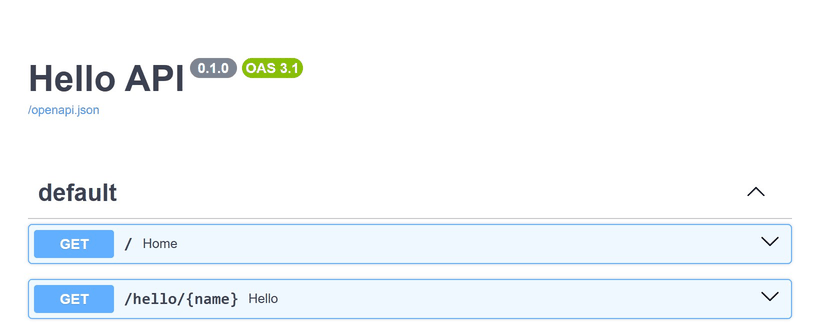
It starts from the same route table. FastAPI writes that table out as one JSON description at /openapi.json, and the page reads it. That's why your two routes show up as two rows. The server log shows both requests:
INFO:     127.0.0.1:54978 - "GET /docs HTTP/1.1" 200 OK
INFO:     127.0.0.1:54978 - "GET /openapi.json HTTP/1.1" 200 OK
Try a route, no code
Open the /hello/{name} row and click Try it out. A box for name appears. Type Emma and click Execute. The page sends a real request, on the same trip as before:
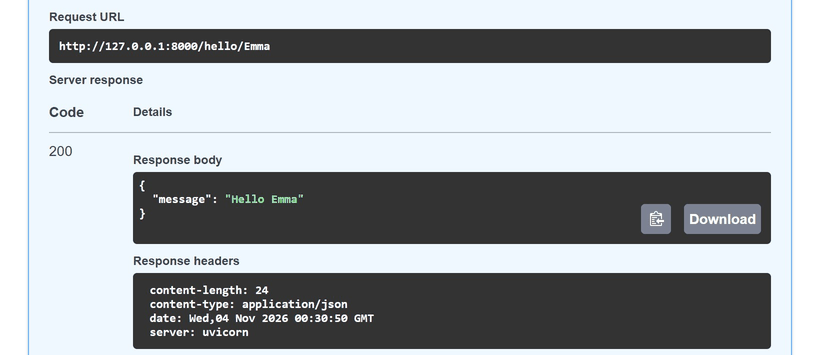
Type a value, click Execute, read the answer. No code at all. The same GET /hello/Emma line appears in the server log.
Common mistakes
- Running
python main.py. That just defines the app and exits. Start it with uvicorn:python -m uvicorn main:app. - Wrong
file:objectpair.main:appmeans the filemain.pyand the variableapp. Rename either one and the command must change too. - Closing the terminal. The server lives in that terminal. Close it (or press CTRL+C) and the address stops answering.
- Expecting a crash on an unknown URL. FastAPI answers 404 on its own. If you get 404, check the path in the route table on
/docs.
Quick recap
| Piece | What it does |
|---|---|
app = FastAPI(...) | One object that holds the app and its route table |
@app.get("/path") | Writes one route: this URL goes to this function |
{name} in the path | A piece of the URL becomes a function parameter |
python -m uvicorn main:app --port 8000 | Starts the server that listens and passes requests in |
/docs | Swagger UI, built from /openapi.json, to try routes without code |
A function can return anything, even a forecast. That's exactly what we do next: put the saved rain model behind a FastAPI route.
Try it yourself
Add a third route, @app.get("/bye/{name}"), that returns {"message": "Bye <name>"}. Restart uvicorn, then check that it shows up as a new row on /docs and try it from there.
Built this? Share your solution in the StudyEasy AI Community.
Join free on Skool →Saving and Loading Models with joblib: One Pipeline, One File
Next →Deploy a Machine Learning Model with FastAPI: POST /predict for a Saved Model
StudyEasy AI Community

Learn AI engineering, share what you build, and connect with other learners.
Free resources: lesson files, notebooks and code
Ask questions and join engineering discussions
Meet real people learning and building with AI
Machine Learning Engineer: From First Model to ML Engineer
Learn machine learning in Python, then ship it: data analysis, regression, classification, tuning, deployment and MLOps.View on Udemy ↗: Machine Learning Engineer: From First Model to ML Engineer (opens in a new tab)Related articles
Python Virtual Environments: One Project, One Toolbox
Why every Python project gets its own virtual environment: two projects that need different versions of requests, python -m venv .venv, activation, pip install and the PyCharm setting that activates it for you.
Git and GitHub Fundamentals: Commits, Branches, Push and Pull
The Git you use every day, on a tiny hello-ml project: commits as save points, the staging area, a branch merged with a fast-forward, then push, clone, pull and pull requests with a teammate.
Testing a FastAPI App with pytest: Three Small Tests
A tiny FastAPI app with a Hello World route and a name route that refuses numbers, three pytest tests that check it, and what happens when the validation is deleted by mistake.
Config and Logging Instead of Hard-Coded Values in ML Training
Take the hard-coded values out of a car price training script: one config.toml read with tomllib, logging with levels and a run id on every line, and secrets read from the environment. Same RMSE, 2195, before and after.