
The Django Project Folder Structure, File by File: Reading a Blog an AI Agent Built
A tour of a finished Django blog: manage.py, the project package, the blog app with its models, views, templates, forms and admin, a custom command, the REST API and Swagger docs, plus the review points check --deploy found.
What you will learn
- Say what manage.py, settings.py, urls.py, wsgi.py and asgi.py each do
- Find the models, migrations, views, templates, forms and admin of an app
- Explain what a custom management command is and where the API files sit
- Spot development settings and other review points with check --deploy
Before you start
- A Django project and app
- Django models and migrations
When an AI agent builds a Django app for you, you become the architect. You need to know where each piece sits, so that when something breaks, or you want to change a page, you know which file to open. This article walks through a finished blog (Django 6.1.3, SQLite) one folder at a time, and points out the lines worth a second look in review.
The tree at a glance
At the top level there are only a few things. manage.py sits at the root, and you run every command through it. blogproject is the project package with the settings and the main URL file. blog is the app, with the blog's own code. static holds the CSS, JavaScript and images from the design. One project can hold many apps; this one has one.
manage.py
def main():
    """Run administrative tasks."""
    os.environ.setdefault('DJANGO_SETTINGS_MODULE', 'blogproject.settings')
    try:
        from django.core.management import execute_from_command_line
    except ImportError as exc:
        raise ImportError(
            "Couldn't import Django. Are you sure it's installed and "
            "available on your PYTHONPATH environment variable? Did you "
            "forget to activate a virtual environment?"
        ) from exc

    # If no arguments provided, default to runserver
    if len(sys.argv) == 1:
        sys.argv.append('runserver')

    execute_from_command_line(sys.argv)
The first line sets DJANGO_SETTINGS_MODULE, so every command knows which settings to load. Then execute_from_command_line reads what you typed and runs that command.
Look at the three lines under the comment. The agent added them: if you type no command at all, it adds runserver for you. Handy, but it isn't standard Django, and someone new to the project won't expect it. Treat it as a review point and keep typing the full python manage.py runserver.
python manage.py checkSystem check identified no issues (0 silenced).settings.py: the house rules
INSTALLED_APPS lists every app the project loads. The first six come with Django (admin, auth, sessions and so on). Then rest_framework and drf_spectacular, which give us the API and its docs, and finally blog. If an app isn't in this list, Django doesn't see it.
MIDDLEWARE is a chain of small checks every request passes through. One of them, the CSRF check, protects the forms; it's covered in how a request and a login flow through Django. TEMPLATES has 'APP_DIRS': True, so Django finds HTML files inside each app's templates folder. DATABASES points to SQLite, one file, db.sqlite3, next to manage.py.
Three lines to review
At the top of the same file (secret value replaced here):
# SECURITY WARNING: keep the secret key used in production secret!
SECRET_KEY = 'django-insecure-...'

# SECURITY WARNING: don't run with debug turned on in production!
DEBUG = True

ALLOWED_HOSTS = []SECRET_KEYis written straight into the code. Django uses it to sign sessions and tokens, so on a public server it should come from an environment variable, not a file in the repository.DEBUG = Trueis fine on your machine, because errors show full details. On a public site it shows those details to everyone.ALLOWED_HOSTSis empty, which only works whileDEBUGis on.
These are development settings, not secure defaults. Django has a command for exactly this:
python manage.py check --deployIt reported System check identified 13 issues (0 silenced). Among the security ones:
?: (security.W009) Your SECRET_KEY has less than 50 characters, less than 5 unique characters, or it's prefixed with 'django-insecure-' indicating that it was generated automatically by Django. Please generate a long and random value, otherwise many of Django's security-critical features will be vulnerable to attack.
?: (security.W018) You should not have DEBUG set to True in deployment.
?: (security.W020) ALLOWED_HOSTS must not be empty in deployment.
Run it before a project goes online, and ask the agent to fix what it finds.
The main URLs, wsgi and asgi
blogproject/urls.py is the host at the door. Every request starts here:
urlpatterns = [
    path('admin/', admin.site.urls),
    path('', include('blog.urls')),
    # API endpoints
    path('api/', include('blog.api_urls')),
    # Swagger/OpenAPI documentation
    path('api/schema/', SpectacularAPIView.as_view(), name='schema'),
    path('api/docs/', SpectacularSwaggerView.as_view(url_name='schema'), name='swagger-ui'),
    path('api/redoc/', SpectacularRedocView.as_view(url_name='schema'), name='redoc'),
]
admin/ goes to Django's admin site. The empty path hands all normal pages to the app's blog.urls. api/ goes to the JSON API, and the last three lines serve the schema, the Swagger docs and ReDoc.
Next to it, wsgi.py and asgi.py each create an object called application with the same settings. A production web server loads that object to run the site. runserver is only for development.
Models and migrations
blog/models.py has three classes, and each becomes a table. UserProfile adds a bio and an avatar to a user. Post has a title, a slug, an author, the content, an excerpt, a category and a status. Comment links to a post and an author. After migrate, SQLite has blog_comment, blog_post and blog_userprofile.
The migrations folder holds four files:
blog
 [X] 0001_initial
 [X] 0002_post_excerpt_post_featured_image
 [X] 0003_remove_post_excerpt_remove_post_featured_image
 [X] 0004_post_category_post_excerpt
Read the names. One adds an excerpt, the next removes it, and the last adds it back with a category. That's the agent changing its mind, and the history keeps every step. models.py says what the tables look like; migrations is the record of how they got there. (The cycle itself is in Django models, migrations and the admin.)
The app's URLs and views
urlpatterns = [
    path('', views.home, name='home'),
    path('register/', views.register, name='register'),
    path('login/', views.login_view, name='login'),
    path('logout/', views.logout_view, name='logout'),
    path('dashboard/', views.dashboard, name='dashboard'),
    path('profile/', views.profile, name='profile'),
    path('post/create/', views.create_post, name='create_post'),
    path('post/<slug:slug>/', views.post_detail, name='post_detail'),
    path('post/<slug:slug>/edit/', views.edit_post, name='edit_post'),
    path('post/<slug:slug>/delete/', views.delete_post, name='delete_post'),
    path('author/<str:username>/', views.author_posts, name='author_posts'),
]
Each path names a view in views.py. Here's home:
def home(request):
    """Home page displaying all published posts"""
    posts_list = Post.objects.filter(status='published')

    # Search functionality
    search_query = request.GET.get('search', '')
    if search_query:
        posts_list = posts_list.filter(
            Q(title__icontains=search_query) |
            Q(content__icontains=search_query) |
            Q(author__username__icontains=search_query)
        )

    # Pagination
    paginator = Paginator(posts_list, 6)  # 6 posts per page
    page_number = request.GET.get('page')
    posts = paginator.get_page(page_number)

    return render(request, 'blog/home.html', {'posts': posts, 'search_query': search_query})
It asks the model for published posts, splits them into pages of six, and renders blog/home.html. Some views, like dashboard and create_post, have @login_required above them, a decorator that sends a visitor to the login page first. The home page came back with status 200 and the title Home - Elegant Blog.
Templates and static files
Templates sit inside the app, in blog/templates/blog/. base.html is the frame with the header, menu and footer. It loads static and links three CSS files:
{% load static %}
...
<link rel="stylesheet" href="{% static 'css/theme.css' %}">
<link rel="stylesheet" href="{% static 'css/globals.css' %}">
<link rel="stylesheet" href="{% static 'css/main.css' %}">
home.html starts with {% extends 'blog/base.html' %} and fills a block called content. Inside, {% for post in posts %} loops over the posts and {{ post.title }} prints each title. The CSS, JavaScript and images come from the root static folder because STATICFILES_DIRS = [BASE_DIR / 'static'] in settings points there.
There's also a templates/account folder with login, logout and signup pages. No view uses them, because the views render the ones in the blog folder. That's a good question to put to the agent.
forms.py
class UserRegistrationForm(forms.ModelForm):
    ...
    class Meta:
        model = User
        fields = ['username', 'email', 'first_name', 'last_name']
        widgets = {
            'username': forms.TextInput(attrs={'class': 'form-control', 'placeholder': 'Username'}),
            ...
        }

    def clean_email(self):
        email = self.cleaned_data.get('email')
        if User.objects.filter(email=email).exists():
            raise forms.ValidationError('This email is already registered.')
        return email

    def clean(self):
        cleaned_data = super().clean()
        password = cleaned_data.get('password')
        password_confirm = cleaned_data.get('password_confirm')

        if password and password_confirm and password != password_confirm:
            raise forms.ValidationError('Passwords do not match.')

        return cleaned_data
The form is built from the User model, and Meta lists four fields. widgets set how each input looks: the CSS class and the placeholder text. clean_email checks nobody already registered with that email, and clean checks the two passwords match. A form draws the inputs in the template and checks what the user typed before anything is saved. There are three more forms in the file, for posts, comments and the profile.
admin.py registers, it doesn't build
Django already ships a full admin site at /admin. admin.py doesn't build it; it registers our models with it and decides what the admin shows for them:
@admin.register(Post)
class PostAdmin(admin.ModelAdmin):
    list_display = ['title', 'author', 'status', 'created_at', 'updated_at']
    list_filter = ['status', 'created_at', 'author']
    search_fields = ['title', 'content', 'author__username']
    prepopulated_fields = {'slug': ('title',)}
    date_hierarchy = 'created_at'
    ordering = ['-created_at']
list_display picks the columns in the post list. CommentAdmin adds two actions, approve and disapprove, so staff can handle several comments at once. It isn't a separate admin area of the blog.
management/ holds custom commands
The management folder is easy to guess wrong. It isn't the admin panel. It holds custom commands for manage.py:
from django.core.management.base import BaseCommand
...

class Command(BaseCommand):
    help = 'Creates sample blog posts for demonstration'

    def handle(self, *args, **kwargs):
        ...
The file name create_sample_posts.py becomes the command name. The class must be called Command and extend BaseCommand. help is what manage.py help create_sample_posts prints, and handle is the method that runs. Here it creates a seeded admin user (with a hard-coded password, another review point) and then six sample posts. After the line about the admin user (left out here because it prints the password), the run printed:
Created post: Getting Started with Django Development
Created post: Modern Web Design Trends in 2024
Created post: The Power of Python in Data Science
Created post: Building Responsive Layouts with CSS Grid
Created post: Introduction to Machine Learning
Created post: Mastering Git and GitHub for Collaboration

✓ Created 6 sample blog posts
✓ All posts are published and ready to view!
When you need a job you can repeat, like loading test data, a custom command is the Django way to do it.
The API files and Swagger
router = DefaultRouter()
router.register(r'posts', PostViewSet, basename='post')
router.register(r'comments', CommentViewSet, basename='comment')
router.register(r'profiles', UserProfileViewSet, basename='profile')

urlpatterns = [
    path('', include(router.urls)),
]
api_urls.py registers three resources with a router. api_views.py has a view set for each; PostViewSet lets anyone read, but you must be logged in to write. serializers.py turns a Post object into JSON. A request to /api/posts/ came back as application/json with the keys count, next, previous and results, and a count of 6. The web pages and the API share the same models: two ways out of the same kitchen.
drf_spectacular reads the views and serializers and builds an OpenAPI schema at /api/schema/, listing nine paths for posts, comments and profiles. /api/docs/ shows it as a Swagger page:
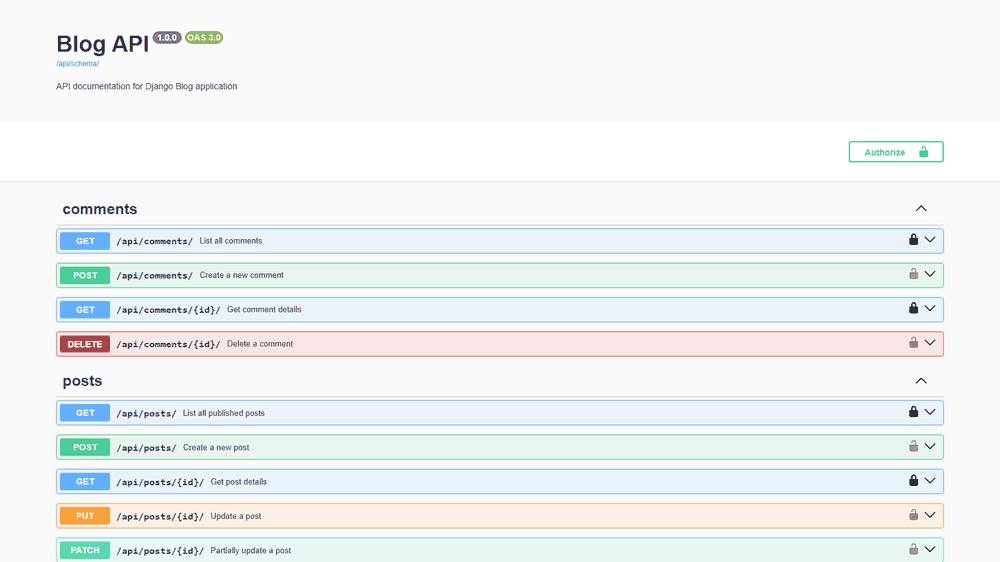
Each row is one endpoint with its method and summary, and you can try it from the browser. The schema build reported warnings, mostly that it couldn't resolve the type hint for get_comments_count and get_read_time in the serializers. Small, but a good thing to hand back to the agent.
The rest of the root
requirements.txtlists packages with a minimum version, likeDjango>=6.0.4.requirements.lock.txtpins the exact versions that ran:django==6.1.3,pillow==13.0.0,django-tinymce==5.0.0,djangorestframework==3.18.3,drf-spectacular==0.30.0.django-tinymceis installed but not inINSTALLED_APPS, and no file uses it. Another question for the agent..gitignorekeeps the database, the virtual environment and caches out of git.setup_demo.pycreates the same admin user and posts as the custom command. Two ways to seed is one too many.blog/tests.pyis still empty. It gets filled in testing the Django blog with pytest.
Quick recap
| File or folder | Job | Review point found |
|---|---|---|
manage.py | runs every command | non-standard default to runserver |
settings.py | apps, middleware, templates, database | hard-coded SECRET_KEY, DEBUG, empty ALLOWED_HOSTS |
blogproject/urls.py | admin, pages, API, docs | |
models.py, migrations/ | tables and their history | excerpt added, removed, added back |
views.py, templates/ | logic and pages | unused account templates |
forms.py | draw inputs, check input | |
admin.py | registers models with Django's admin | |
management/commands/ | custom manage.py commands | duplicates setup_demo.py |
api_*.py, serializers.py | JSON API and Swagger | schema type-hint warnings |
Try it yourself
Run python manage.py check --deploy on your own blog, ask an AI tool to fix one warning, and review the diff it gives you before you accept it.
Related course on Udemy
The Python Architect Masterclass: Full Stack to AI Engineer
Python, Django, FastAPI, React, Docker, AWS, LLMs, RAG, agents and MCP, from first steps to AI engineer.View on Udemy ↗: The Python Architect Masterclass: Full Stack to AI Engineer (paid course, opens in a new tab)Related posts
Django, FastAPI or Flask? The Same Blog Feature in Three Shapes, and How to Choose
One small project lists two blog posts three times: as a Django view, a Flask route and a FastAPI endpoint. See each shape with its real output, what each framework includes, and a three-question way to choose.
Getting Started with Django: Models, Views, Templates, the ORM and the Admin
A tiny Django menu app with one model, one view, one URL, one template and the admin. What each file does, how one request travels through them, and the real output of a run.
Your First Django Project and App: uv, startproject, startapp and a First View
Set up a Django project called blogproject with uv, add an app called blog, write one view that returns Hello blog, give it the empty path and run the server. Every command with its real output.
How a Request and a Login Flow Through Django: URLconf, ORM, CSRF, Password Hashes and Sessions
Follow the home page from URLconf to SQLite and back (8 queries), then a login: the csrftoken, a 403 without it, the pbkdf2 password hash, the django_session row, the sessionid cookie, and a review finding about who may write posts.